
Think of a text reader for iPad as a personal narrator tucked inside your device. It takes any text you throw at it—documents, web pages, even ebooks—and reads it aloud in a clear, high-quality voice. This simple trick lets you catch up on reading while you’re on the move, slashing your screen time without sacrificing productivity. It’s a game-changer for multitasking, studying, or just giving your eyes a much-needed break.
Turn Your iPad Into a Personal Narrator
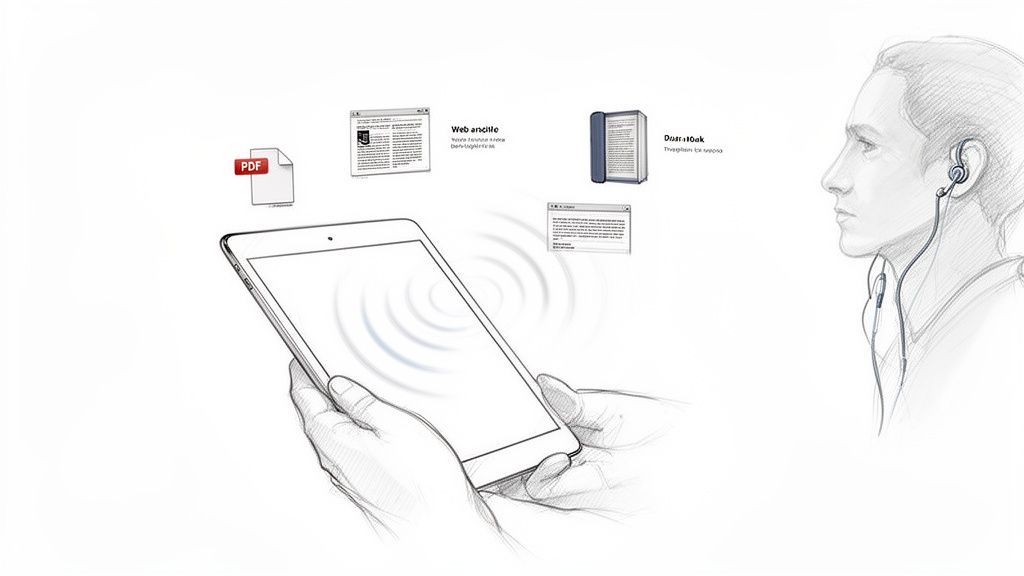
, web article, and book icons.](https://cdn.outrank.so/a477fc22-0875-45b9-a879-cf6683f08a2d/541c3af5-6bc2-4ae2-8ed8-d25ef87a61d6/text-reader-for-ipad-audio-reader.jpg)
Ever wish you could get through that long report while cooking dinner or turn your commute into a productive study hall? That’s exactly what a good text reader does. It liberates your reading from the screen, transforming it into an audio experience that can fit into just about any corner of your day.
And forget about those clunky, robotic voices from years ago. Modern text-to-speech (TTS) is powered by sophisticated AI that produces narration sounding incredibly human. These tools understand punctuation and context, delivering speech that flows naturally, making it easy and genuinely pleasant to listen to.
Why Audio Reading Is Gaining Popularity
Listening to content isn’t just a trend; it’s a smart response to our busy lives. The biggest draw is the ability to multitask. You can absorb information while you’re at the gym, walking the dog, or driving. This approach doesn’t just save you time—it also helps combat the digital eye strain that comes from staring at screens all day.
The market numbers tell the same story. The global book reading apps market, which includes text readers for iPad, is expected to skyrocket from $15 billion in 2025 to an incredible $40 billion by 2033. A big part of that growth comes from integrated TTS features, with 41% of ebook readers already choosing tablets like the iPad for their reading. You can discover more insights about book reading app trends to see just how fast this is moving.
A high-quality text reader for iPad doesn’t just read words; it creates an experience. It allows you to consume content in a way that suits your lifestyle, turning every moment into an opportunity for learning and productivity.
At the end of the day, these apps bridge the gap between written words and your ears, offering some powerful benefits:
- Increased Productivity: Listen to articles, reports, and study guides while your hands and eyes are busy with other things.
- Reduced Screen Time: Give your eyes a rest from the constant blue light without falling behind on your reading list.
- Enhanced Accessibility: These are essential tools for anyone with visual impairments, dyslexia, or other reading challenges.
- Improved Comprehension: For many people, hearing text read aloud helps lock in information and improve retention.
How Text-to-Speech Technology Actually Works
Behind every great text reader for iPad is a fascinating piece of tech called text-to-speech, or TTS. It’s easy to think of it as just a recording playing back, but it’s much more like having a digital narrator on call. The software doesn’t just play audio files; it actually creates a human-like voice from scratch, turning the text on your screen into something you can listen to.
It all starts with a cleanup phase called text normalization. Before a single sound is made, the app reads through the text to make sense of it. It expands abbreviations like “Dr.” into “Doctor,” figures out that “1998” should be read as “nineteen ninety-eight,” and understands what to do with punctuation. A comma means a short pause, and a question mark completely changes the tone of the voice at the end of a sentence.
From Text to Sound Waves
Once the text is prepped, the real magic begins. The TTS engine breaks everything down into the smallest units of sound, known as phonemes. Think of these as the fundamental building blocks of speech, like the ‘k’ sound in “cat” or the ‘sh’ in “shore.”
This is where modern AI has completely changed the game. Instead of just stringing these sounds together robotically, advanced algorithms look at the entire sentence to understand the context. This is how the app knows the word “read” sounds different in “I will read the book” compared to “I have read the book.” That contextual awareness is what separates today’s incredibly lifelike voices from the monotone, robotic ones you might remember from years ago. Finally, the system generates the actual sound waves that play through your speakers.
Here’s a look at how a modern app like TTS Reader Pro makes this process dead simple. You can just drop in a link to an article, and it’s ready to go.
The whole point is to get you listening instantly, with controls for the voice and speed right at your fingertips.
Handling Complex Documents
But what happens when you’re not dealing with a clean webpage? Think about a typical PDF—it’s often a messy mix of text, images, complex tables, and footnotes. A truly good text reader for iPad is smart enough to navigate this chaos.
Using intelligent document analysis, the software identifies the main block of text you actually want to hear. It follows the natural reading order, skipping over things like page numbers, headers, and decorative graphics that would otherwise make the audio a choppy, confusing mess.
Modern TTS isn’t just about getting the pronunciation right; it’s about conveying the author’s original meaning. By understanding the document’s structure and context, the app delivers a narration that’s not just accurate, but also easy to follow.
When the app comes across a table, for instance, it won’t just read all the cells in a jumble. It’s programmed to either read it in a logical way or skip it entirely to keep the main narration smooth. This ability to parse complex layouts is what makes these tools so valuable for students tackling academic papers or professionals reviewing dense reports. It ensures the audio is a genuinely useful tool, not just a gimmick.
Choosing The Right Text Reader For Your Needs
Picking the perfect text reader for iPad can feel a bit like scrolling endlessly through the App Store. So many options pop up, all claiming to be the best. The real trick is to zero in on the features that actually solve your problems and slide right into your daily routine.
Let’s be honest, not all apps are created equal. Some are just basic readers, while others are full-blown productivity powerhouses.
Think about it like buying a car. Sure, a simple sedan will get you from point A to B. But an SUV gives you the flexibility for a road trip, hauling gear, or navigating a rough patch of road. A top-tier text reader is that SUV—it comes packed with specialized tools like high-quality voices, broad file support, and scanning capabilities that can handle whatever you need it to.
Let’s break down the must-have features you should be looking for.
High-Quality and Diverse AI Voices
This is the big one. The quality of the narration can make or break the entire experience. If you’re stuck with a robotic, monotone voice, you’ll tune out in minutes. It’s just a chore to listen to. The best modern apps use sophisticated AI to generate voices that sound remarkably human, complete with natural pacing and intonation.
A great app won’t just give you one good voice; it will offer a whole library of them. You should be able to pick from different voices and accents to find one that’s genuinely pleasant to listen to for hours. Maybe you want a crisp British accent for a classic novel or a clear, straightforward American voice for a dense technical report. Having choices is everything.
Some apps even go a step further with premium or HD voices. These are a cut above the rest, synthesized from massive datasets to produce a rich, nuanced sound that feels less like a computer reading to you and more like a person telling a story.
Broad Support For Different File Types
Your digital life is a mix of all sorts of files, and your text reader needs to keep up. Nothing is more frustrating than hitting a wall because your app can’t open the document you need. The best apps are built to be versatile.
Look for an app that can handle all the essentials without a fuss:
- PDFs: The go-to for academic papers, business reports, and just about any official document.
- EPUBs: The standard format for most ebooks you’ll find outside of the Kindle store.
- DOCX and TXT: Perfect for your own notes, drafts, and other simple text files.
When an app supports all these formats, you can jump from listening to a research paper to a new novel without missing a beat. It just works.
Scanning and Optical Character Recognition
What about all the paper in your life? This is where Optical Character Recognition (OCR) comes in, and it’s a total game-changer. This feature lets you use your iPad’s camera to snap a picture of a printed page and turn it into audio you can listen to instantly.
Just think about it. You can turn a chapter from a heavy textbook, a printed handout from a meeting, or a few pages from a library book into an impromptu audiobook. It’s like having a high-speed scanner right in your pocket. An app with a solid OCR function, like TTS Reader Pro, closes the gap between your physical and digital worlds.
This decision tree gives you a peek into how the technology works, moving from simple text to sophisticated, AI-driven narration.
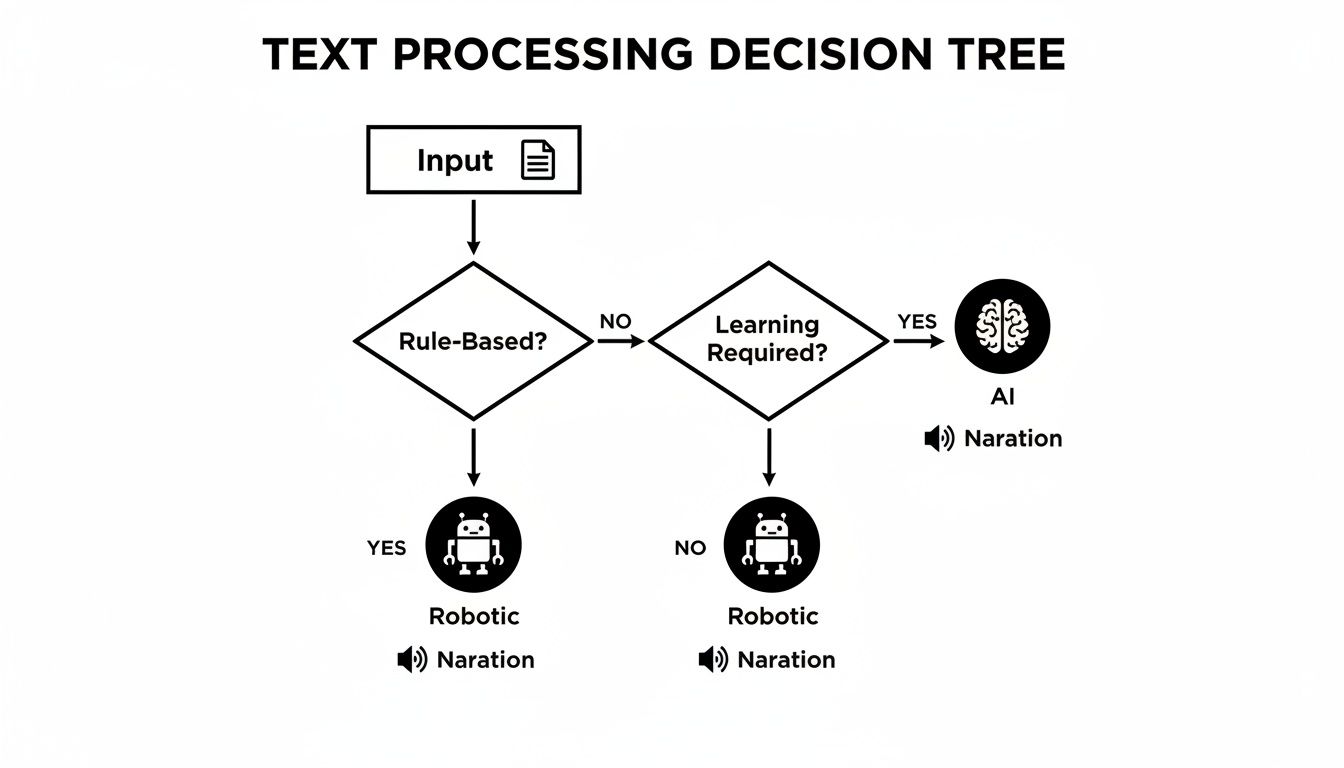
As the flowchart shows, modern AI processing delivers a much more natural and context-aware narration than the clunky, rule-based systems of the past.
Integration With Web Pages and Kindle
A truly great text reader for iPad should fit into how you already consume content. The ability to copy a link from a website, paste it into the app, and have it read the article back to you is a huge time-saver. It’s perfect for catching up on news or blog posts while you’re doing something else.
For avid readers, direct Kindle integration is an absolute must. Apps that can sync with your Kindle library are incredible because they let you listen to books you already own. You essentially get to convert your entire ebook collection into an audiobook library without spending another dime. With iOS devices projected to hit 1.38 billion active users by 2026, many of whom are happy to pay for premium app features, this kind of seamless integration is what separates the good apps from the great ones. You can dig deeper into iOS market trends and user behavior here.
When you’re comparing apps, it helps to have a checklist handy. The table below breaks down the most important features to look for and why they matter.
Key Feature Checklist For a Text Reader App
| Feature | Why It’s Important | Example Application |
|---|---|---|
| High-Quality AI Voices | Prevents listening fatigue and makes the experience enjoyable. | Choosing a specific voice and accent (e.g., British English) that you find engaging for a long audiobook. |
| Broad File Support | Ensures you can listen to any document you have, from PDFs to EPUBs. | Importing a PDF research paper from a professor and an EPUB novel into the same app for easy access. |
| OCR/Scanning Capability | Turns physical documents into listenable audio, bridging the gap between print and digital. | Taking a photo of a recipe from a cookbook or a handout from a meeting and having it read aloud. |
| Web Page & Link Reading | Allows for hands-free consumption of online articles, news, and blogs. | Pasting the URL of a long news article to listen to during your morning commute instead of reading on your phone. |
| Kindle Integration | Unlocks your existing ebook library for listening without requiring new purchases. | Syncing your Kindle account to listen to a novel you bought last year while you’re out for a walk. |
| Offline Functionality | Lets you listen anywhere, regardless of internet connection—perfect for flights or subways. | Downloading several articles and an ebook chapter before a flight so you can listen without needing Wi-Fi. |
| Accessibility Features | Provides essential support for users with visual impairments or reading disabilities. | Adjusting the speech rate for easier comprehension or using high-contrast modes for better visibility. |
This checklist isn’t just about bells and whistles; it’s about finding a tool that genuinely makes your life easier and more productive.
By choosing an app with these key features—excellent voices, wide file support, OCR, and smart integrations—you ensure your text reader is a powerful, flexible tool that adapts to your needs, rather than a limited gadget.
Who Benefits Most from Reading with Audio
While the tech behind a text reader for iPad is impressive, its real value comes from the people it helps every day. These aren’t just abstract benefits; they solve real, tangible problems for a surprisingly wide range of individuals. From professionals on the go to students buried in textbooks, listening to text just fits into modern life, making information easier to get through.
This move to audio makes perfect sense when you look at how we use our devices. Apps now make up a staggering 70% of all digital media time in the US. With global app revenue projected to hit nearly $935 billion by 2025, it’s clear that people want high-quality tools on their iPads. You can dive deeper into the growth of the app economy on Buildfire.com.
The Overloaded Student
Think about today’s student. They’re juggling multiple classes, a part-time job, and a mountain of research papers and required reading. For them, just finding the time to sit down and read is a daily battle. This is where a text reader becomes an academic secret weapon.
It lets them turn dense PDFs and textbook chapters into audio. Suddenly, they can listen to lecture notes on the bus or review a complex article at the gym. All that “dead time” is instantly transformed into a productive study session.
- Scenario: A history major needs to get through three heavy academic articles before their next seminar.
- Solution: They use an app like TTS Reader Pro to import the PDFs. Now they can listen to the material while tidying their room or making dinner, soaking up the information without adding more screen time to an already long day.
The Multitasking Professional
For the busy professional, staying on top of things means constantly digesting industry reports, news, and long email chains. A text reader for their iPad essentially becomes a personal assistant, letting them stay informed while their hands and eyes are busy with other things.
This technology lets professionals take back their commute. Instead of squinting at a small phone screen on a packed train, they can just hit play and absorb key information, walking into the office already ahead of the game.
Imagine a marketing manager who has to review a 50-page competitor analysis. They can listen to the whole thing on their drive to work, freeing up their time at the office for strategy and working with their team. It’s an incredible tool for getting more done.
The Accessibility User
Beyond just being convenient, text-to-speech is a game-changer for accessibility. For someone with dyslexia, a visual impairment, or another condition that makes reading difficult, a text reader isn’t a luxury—it’s a lifeline. It simply removes barriers to information.
These apps provide a clear, steady voice for any written content, opening up books, articles, and school materials to everyone. Features like adjustable speeds and high-contrast highlighting give users the power to tailor the experience to their exact needs, which builds confidence and independence.
The Avid Language Learner
Finally, let’s look at someone trying to master a new language. Nailing pronunciation and getting a feel for the natural cadence of a language takes a ton of listening practice. A text reader is perfect for this.
With access to dozens of high-quality voices in different languages, learners can listen to pretty much anything—news articles, blog posts, even entire books—in their target language. This is a fantastic way to connect the written word to its spoken sound, which sharpens both listening skills and accent. It’s like having a native speaker on call, ready to read whatever you want.
Getting Started With Your First Document
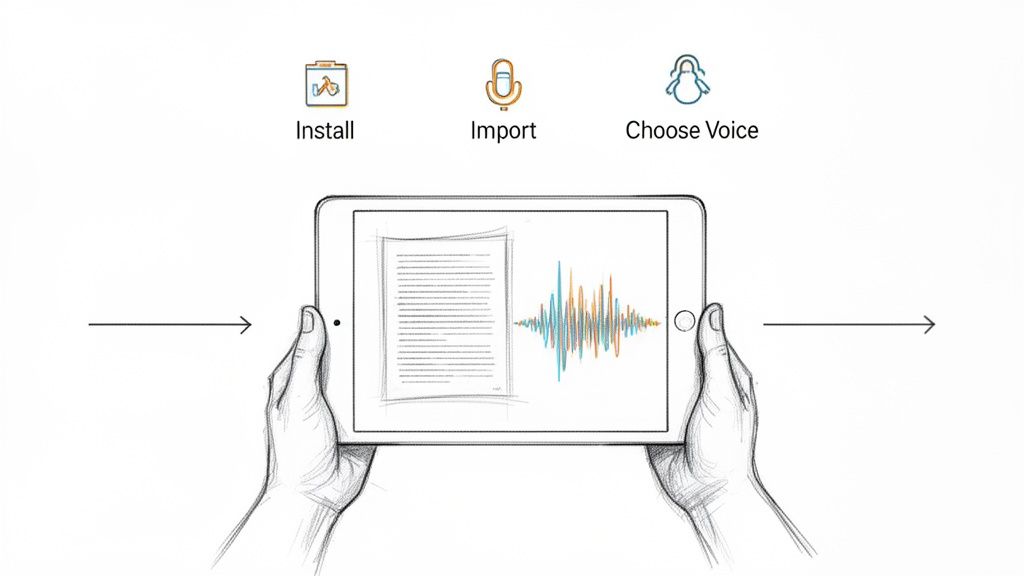
Ready to dive in? The good news is that getting started with a text reader is incredibly straightforward. Most well-designed apps, like TTS Reader Pro, guide you from download to listening in just a couple of minutes. The first step is the easiest: head to the App Store on your iPad, find your app, and tap install.
Once it’s installed, think of the app as your new digital library, ready to be filled. The real magic happens when you bring in your first document. You’ll find that the best text reader for iPad apps give you a bunch of simple ways to add content, so nothing technical stands between you and your reading list.
Three Easy Ways to Import Your Content
The most important part of the process is getting your documents into the app, and thankfully, modern text readers have made this feel almost effortless. You can usually pull in text from just about anywhere on your iPad with a few quick taps. The whole point is to make it as natural as saving a photo or opening an email attachment.
Here are the three most common methods you’ll likely use:
- From Your Files: Just tap the import button (it’s often a “+” symbol) and browse your iPad’s Files app. Find the document you want—like a PDF, EPUB, or TXT file—select it, and watch it appear in your app’s library.
- Pasting a Web Link: Stumbled upon an interesting online article? Copy its URL, open your text reader, and look for an option like “add from web” or “paste link.” The app will cleverly strip out the ads and pull in the core text, ready for playback.
- Using the Camera to Scan: This is where OCR comes in handy for physical books or papers. Choose the scan or camera option, snap a clear photo of the page, and the app will work its magic, turning the printed words into editable, listenable text.
This kind of flexibility means you can turn almost any written material into your own personal audiobook.
A great text reader removes friction. The process should feel seamless, whether you’re uploading a complex academic paper, scanning a quick memo, or listening to the day’s news from a web link.
Importing Content into Your Text Reader
Getting your content into an app like TTS Reader Pro is simple. The table below breaks down the most common methods so you can see which one fits your needs best.
| Import Method | Best For | Simple Steps |
|---|---|---|
| Direct File Upload | PDFs, EPUBs, Word docs, and other saved documents. | Tap the “+” icon, select “Files,” and browse your iPad to find and add the document. |
| Paste from Web | Online news articles, blog posts, and websites. | Copy the article’s URL, open the app, and use the “Add from Web” feature to paste it. |
| Scan with Camera | Physical books, printed handouts, and mail. | Select the camera/scan option, take a clear photo of the page, and let the OCR convert it. |
As you can see, no matter where your text lives—digitally or physically—there’s a simple path to get it into your app for listening.
Customizing Your Listening Experience
Once your document is loaded, the final step is to tweak the audio so it’s just right for you. This is where you can really personalize the experience to make it comfortable and effective, especially for longer listening sessions.
Before you press play, spend a moment in the settings. You can almost always adjust the reading speed—slowing it down for complicated material or speeding it up to breeze through lighter content. The most important choice, though, is the voice. A quality text reader for iPad will offer a library of different high-quality AI voices, with various accents and languages.
Finding a voice that sounds natural and pleasant to your ear is the key to avoiding “listening fatigue.” After you’ve set your speed and picked a narrator you like, you’re all set. Just hit play, sit back, and enjoy your reading, completely hands-free.
Got Questions About iPad Text Readers? We’ve Got Answers.
When you first start looking into text-to-speech, a few practical questions always pop up. It’s totally normal. Getting the right answers can make all the difference in picking the right text reader for iPad and feeling good about using it. Let’s clear up some of the most common things people ask.
Think of this as your quick-start FAQ, designed to give you the confidence to dive in.
Can a Text Reader Handle My Messy PDFs with Charts and Tables?
Yes, and this is where a great app really shines. The best text readers are smart enough to figure out a complex PDF. They can identify the main text and read it in the right order, skipping over all the distracting stuff like page numbers, headers, and image captions.
It’s a huge deal for anyone dealing with academic papers, financial reports, or anything that isn’t just a simple wall of text. The app keeps the audio flowing logically, so you’re not getting a jumbled mess.
Will These Apps Destroy My iPad’s Battery Life?
This is a big one, but the answer is usually no—in fact, they can often save your battery. The single biggest power drain on your iPad is keeping that beautiful screen lit up for hours while you read.
A good text reader for iPad with offline support lets you load your document, lock your screen, and just listen. Playing audio uses way less juice than powering the display, so your battery will actually last much longer during those marathon study or reading sessions.
It’s a lifesaver for long commutes or travel days when you’re nowhere near a power outlet.
Are the AI Voices Actually Better Than the Siri Voice?
Oh, absolutely. There’s no comparison. While Apple’s built-in voice is a solid accessibility tool, the premium AI voices you find in dedicated apps are in a completely different league. They’re built using sophisticated AI that has learned from massive amounts of human speech.
What you get is narration that has natural-sounding pauses, intonation, and even emotional tone. It feels less like a robot and much more like a person reading to you, which makes for a far more enjoyable listen.
Can I Use This to Listen to My Kindle Books?
Some of the top-tier text reader apps have a killer feature: direct Kindle integration. This lets you sync your Kindle library right into the app, turning any ebook you own into a personal audiobook.
If you’ve spent years building a big Kindle collection, this is fantastic. You can finally listen to all those books hands-free on your iPad without having to buy the audiobook version separately. It’s the perfect way to get more value out of the books you already own.
Ready to turn your reading into listening? TTS Pro takes any document, article, or ebook and transforms it into a high-quality audiobook. Stop staring at the screen and start listening. Download TTS Pro today and discover a smarter way to get through your reading list.


No Comments
Leave a comment Cancel