
Listening isn't a shortcut around reading. It's a different way to work through a book, and it works best when you treat it that way. The method you choose, the speed you set, and what you do at chapter breaks matter more than just pressing play. To learn how to listen to books without losing track of the argument, start by matching the format to the material in front of you.
Table of Contents
- Why Listening Counts as Reading Now
- Choose the Right Method for Your Book
- How to Set Up Your Listening Workflow
- Listen Actively Without Losing the Argument
- Fit Listening Into Commutes and Study Blocks
- Match Voice, Speed and Text to Your Needs
- Fix Common Listening Problems
- Start Your First Listening Session Today
Why Listening Counts as Reading Now
The Audio Publishers Association's 2024 Consumer Survey, conducted by Edison Research, found that 52% of U.S. adults, nearly 149 million people, had listened to an audiobook at some point. The 38% who had listened in the previous year, up from 35% in 2023, tell you more about active habits, since ever having listened only shows familiarity.
Those past-year listeners averaged 6.8 titles in 2023, up from 6.3 in 2022. That's not casual sampling. It's a repeat format that people return to across the year.
Listening complements print and digital reading rather than replacing both. A student might review notes aloud before a seminar, while a commuter uses hands-free time for a novel and a professional works through a long PDF report at a desk. People who need or prefer eyes-free access use the same tools for different reasons. The path ahead is simple: choose a method, set it up, listen actively, adjust for your needs, and fix what goes wrong.
Choose the Right Method for Your Book
| Method | Best for | Typical cost | Main limit |
|---|---|---|---|
| Commercial audiobook | Titles with a professionally narrated edition | Per title or subscription | Not every title has an audio edition |
| Library audiobook loan | Free access to popular titles | Free with a library card | Waiting lists and loan periods |
| Text-to-speech app on EPUB, PDF or TXT | Your own files, notes and articles | Free tier with paid upgrades | Voice quality depends on file layout |
| Kindle book in a text-to-speech app | Books you already own on Kindle | App plan after any free tier | Requires signing in to your Kindle account |
| Scanned printed pages | Print-only books, handouts and course packs | Usually free or low cost | Scan quality limits accuracy |
Read the main limit column first. A method fails most often at that point, not at playback. A cheap route that can't handle your document will cost you more time than a paid route that can.
Decide by What You Own
Free library loans, public-domain texts, and publisher-provided files are clearly lawful routes. File-sharing sites may host copies whose authorization is unclear, so check the rights before you download anything.
- Professionally narrated audiobook: Choose this for fiction, memoir, and anything where performance, timing, or character voices carry the book.
- Library loan: Check the waiting list and loan period before you build a schedule around it. A popular title may arrive after your course unit or book club date has passed.
- Text-to-speech app: Use it for your own EPUB, PDF, TXT files, and web articles. Test one dense section first to see how the app handles headings, footnotes, and columns.
- Kindle book: Pick this when the book's already in your library and there's no suitable audio edition. You'll need to sign in to your Kindle account inside the app.
- Scanned pages: Reserve this for print-only books and handouts. Scan and check the first few pages before you trust the rest, because a bent page or shadow can turn into repeated errors.
For a dense technical PDF, chapter and page navigation should decide your choice. You'll need to jump backward to definitions and figures, and a player that only moves forward will frustrate you. Match the method to the material first and the price second.
How to Set Up Your Listening Workflow
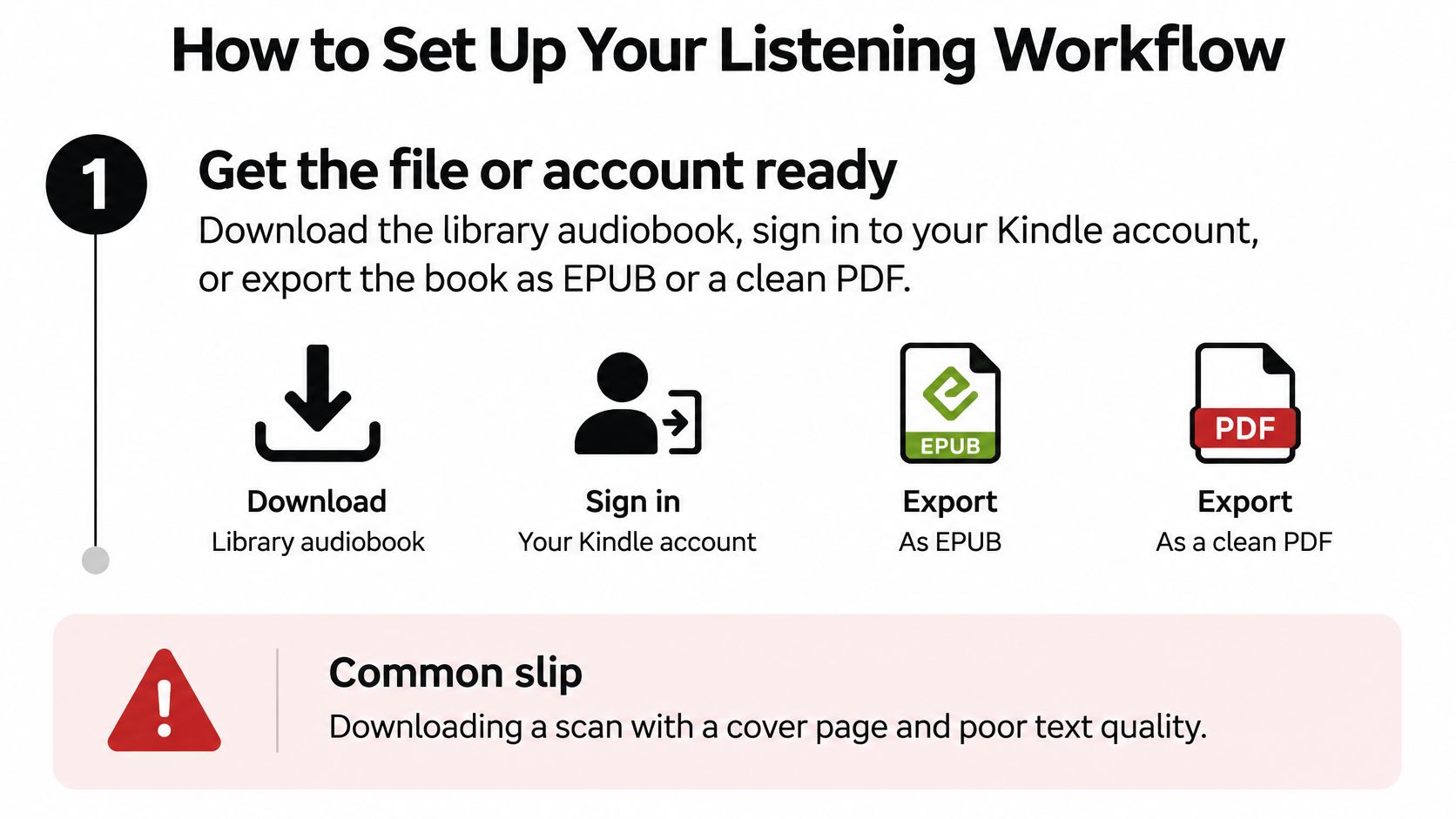

A good setup takes a little testing before the first real session. Rushing this stage is why many first attempts feel clunky. You pick a voice from a clean introduction, press play on a messy PDF, then blame listening itself when headers, misread symbols, and lost places pile up. Work through the file, the text, and the controls in order.
Prepare the File and Check the Text
- Get the file or account ready. Download the library audiobook so it plays offline, sign in to your Kindle account, or export the book as an EPUB or a clean PDF. A common slip is downloading a scan that includes the cover, copyright page, and index, which the app then reads aloud as if they were chapter one.
- Check the text before you trust it. For scanned pages, run text recognition and read the first two pages against the original. Pay attention to numbers, names, punctuation, and words broken across lines. A flat, well-lit scan prevents most errors, and catching a bad scan now saves you from hearing the same mistake for hours.
- Confirm the structure survives the conversion. Open the table of contents and tap through a few headings. If every page arrives as one unbroken block, or if two columns are read across instead of down, fix the file or switch formats before you continue. An EPUB usually reflows more cleanly than a PDF that was designed only for print.
Tune Voice, Speed, and Navigation
- Choose a voice you can tolerate for an hour. Play one paragraph from a dense chapter, not the introduction. Introductions use shorter sentences and hide problems with emphasis, numbers, and unfamiliar terms. If a voice sounds pleasant for thirty seconds but flattens a complicated explanation, it won't serve you across a whole book.
- Set speed by material, not by habit. Start at normal speed for familiar fiction and slow down for technical text, new vocabulary, or accented narration you don't know well. Faster speeds often hide errors in dense sentences because you notice the mistake only after the meaning has passed. You can raise the speed later for a review pass once the material is familiar.
- Set up navigation before you need it. Bookmark chapter starts and confirm you can jump to headings, page numbers, and figures. Test the rewind control and learn how far each tap moves you. If you're studying, check whether you can leave a note or bookmark at an uncertain point without stopping playback for long.
Practical test: Run a 20-minute test session and note exactly where you drifted, rewound, or reached for the text. Those moments tell you what to adjust.
Change only the setting that matches the problem. If you rewound because sentences ran together, slow the pace or add pauses. If you drifted because the voice felt monotonous, change the voice. If you kept losing your place, fix navigation instead.
A working setup feels unremarkable in the best way. You can pause mid-thought, return to an earlier claim, and find a named section within seconds. You don't have to babysit the player, guess which page you're on, or re-listen to ten minutes to recover one sentence. Once the controls fade into the background, your attention can stay on the book.
Listen Actively Without Losing the Argument
The main risk isn't that listening can't convey a book. It's that passive playback lets the storyline flow past while definitions, causal links, and inferences slip away. You finish a chapter feeling familiar with it, then can't explain why the author reached a conclusion or how two claims connect.
A large meta-analysis of 46 studies involving 4,687 participants found no significant overall comprehension difference between reading and listening to the same text, while identifying auditory attention and working memory as distinct demands of listening, according to a summary of that meta-analysis. That distinction is why control matters. Listeners who couldn't control listening pace performed worse on general comprehension and textual inference, while literal fact comprehension was approximately similar to reading.
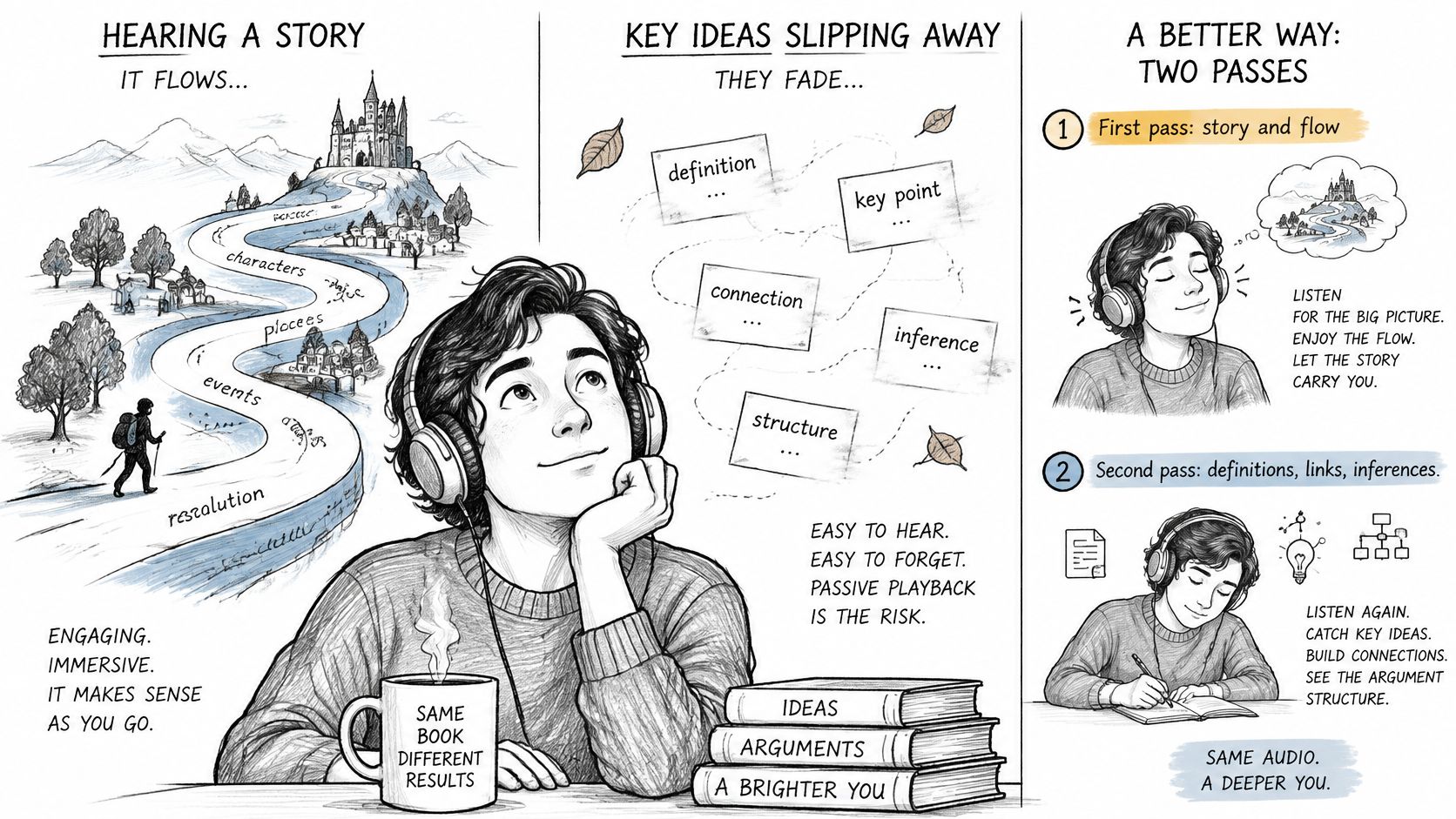

Use Two Passes for Complex Books
On the first pass, listen continuously at normal speed to establish the argument and structure. Don't stop for every unfamiliar term. You're learning where the author is going, which chapters carry the evidence, and which sections only provide background.
On the second pass, return to difficult chapters at a slower, adjustable pace. Pause at chapter transitions, state the central claim aloud, and list the evidence that supports it. Then answer five questions you write yourself and summarize the chapter in three sentences before you move on.
Say you're working through a 300-page technical PDF. You might listen to the whole book once at normal speed to map its structure, then replay chapter four at 0.8x with notes because that's where the method and key definitions sit. You don't need the same treatment for an introductory chapter you've already understood. Spend the second pass where the reasoning is dense.
Don't measure a session by pages covered. Measure it by what you can explain with the audio stopped.
Close with a delayed recall check after 24 hours. Write the same three-sentence summary again without replaying the chapter, then compare versions. Missing definitions point to vocabulary you should review. Missing links between claims tell you to replay the transition where the author connects them. That comparison gives you a precise repair job instead of a vague feeling that you should listen again.
Fit Listening Into Commutes and Study Blocks
Match each file to the slot where you'll hear it. For a 30 to 40 minute commute, choose a narrative or familiar text, such as an audiobook or a fiction EPUB at normal speed. Dense technical material is hard to follow over traffic noise, announcements, and the small decisions travel requires.
Split Study Listening Across Two Sessions
- On the commute: Listen to the chapter once at normal speed for structure. Bookmark the points you don't understand, but don't try to write notes while you're moving.
- At your desk: Reopen the hard chapter, replay only the sections you marked, and write your five questions with the text nearby.
- Before you end: Write the three-sentence summary and save it where you'll find it the next day.
Keep volume low enough to hear your surroundings when walking or cycling, and use a headset rather than a speaker in shared spaces. Assign each book one daily slot, because switching books between sessions makes the delayed recall check hard to interpret. Put a day between the first pass and the recall check, so the commute session and desk session fall on different days and your summary is tested against what you kept.
Match Voice, Speed and Text to Your Needs
One setting doesn't fit everyone, and accessibility advice goes wrong when it treats every barrier as the same. A 2025 eye-tracking study reported that text-to-speech improved comprehension for students with ADHD-related reading difficulties. Students with dyslexia didn't show the same comprehension gain, but text-to-speech reduced their reading time and cognitive effort while preserving comprehension comparable to silent reading.
| Need | Settings to try | What to measure |
|---|---|---|
| Dyslexia | Slower speed, clear voice, text shown only when needed | Reading time and effort, alongside recall |
| ADHD | Synchronized text, short segments, few distractions | Recall after each short segment |
| Screen fatigue | Audio-first listening, heading navigation, regular breaks | Eye strain and how quickly you find a section |
| Visual impairment | Chapter and heading navigation, page numbers, tables and footnotes read aloud | Whether you can reach a table or footnote quickly |
Read the Table as a Starting Point
If you have dyslexia, start with lower cognitive load. A slower speed, a clear voice, and text you can open only when a spelling or term matters may reduce effort without forcing you to track every word visually. Pronunciation support also matters, especially for technical vocabulary that looks unfamiliar on the page.
If you have ADHD-related reading difficulties, try audio-text synchronization with short segments and fewer distractions. The moving text can give your attention an anchor, while a natural stopping point every few pages creates a chance to recall what you've heard. Long, uninterrupted playback makes it easier to realize too late that your attention left several minutes ago.
Screen fatigue calls for a different priority. Go audio-first, take regular breaks, and make sure heading navigation works without staring at the screen to hunt through menus. For visual impairment, test whether you can reach headings, page numbers, tables, and footnotes reliably. Generic advice about listening anywhere doesn't help if a table is skipped or a footnote is impossible to find again.
Test One Setting at a Time
Pick a chapter you know reasonably well and listen with one setting changed. Answer five questions from it, then rate your fatigue and note how much effort the session took. You're measuring comprehension and fatigue, not listening time. Finishing quickly while exhausted or unable to recall the content isn't a successful setting.
Change one setting at a time so you can tell which adjustment helped. If you switch the voice, speed, and text display together, you'll know the session felt different without knowing why. Keep the winning setting for the next chapter and test again.
Fix Common Listening Problems
| Symptom | Likely cause | Fix |
|---|---|---|
| Kindle book fails to load | Expired Amazon sign-in | Sign out, sign back in and refresh the library |
| Names or terms mispronounced | Default pronunciation | Adjust pronunciations in the app settings |
| PDF audio reads headers and page numbers | Layout formatting | Remove headers or use a reflowable EPUB |
| Scanned text has errors | Poor scan quality | Rescan in good light on a flat page |
| Voice tires you within minutes | Voice mismatch | Try another voice at a slower speed |
| Narration cuts out in the background | Battery saver or background limits | Disable battery saver and allow background playback |
Most of these failures take minutes to repair. We require you to log in to your Amazon account for Kindle access, and our support can show you how to refresh that login when books fail to load. Pronunciations can also be adjusted in our app's settings.
A new voice or speed takes longer to judge. Try it across several chapters over a few days, including one difficult section, before you decide it isn't working. One tiring session may reflect the material rather than the setting.
Start Your First Listening Session Today
Give yourself one decision for the next 30 minutes. Pick one file you already have, such as a PDF you need to review, an EPUB you've been meaning to read, or a printed chapter you can scan. Don't start by reorganizing your whole library.
Use the first method table to match that file to a route. Then run the 20-minute test session, adjust the speed or voice once based on what the test showed, and commit to the full chapter. Keep the change small. You're learning how the setup behaves with real material, not searching for a perfect configuration you'll never alter again.
If you want a tool to test this on your own files, TTS Reader Pro from TTS Pro converts PDF, EPUB, TXT and web pages to speech and can turn printed books, notes, or printed text into audiobooks using smart scan technology. We have a free version to try before you pay.
Treat the first session as a test, not a commitment. Once you've matched one file to a method, checked the text, and found settings you can live with, that workflow will carry over to the next book with only small adjustments.
Turn the book or document already sitting on your device into your first test session with TTS Pro, where you can convert text, eBooks, PDFs, EPUB and TXT files, and web pages into speech, or scan printed pages into audio. Start with the free version, run one chapter through your new workflow, and keep the settings that help you recall more with less fatigue.


No Comments
Leave a comment Cancel