
You've got lecture notes to review, a PDF you keep putting off, and a scanned chapter that would be easier to finish on the commute. You want to convert text to audio free, but getting a file to play is only half the job. You also need to know whether it reads the right words, keeps the document in order, and exposes anything private along the way.
A useful workflow starts with the source file, not the voice menu. Choose the simplest suitable method, test a difficult passage, and commit to the full document only when the result is accurate enough to use.
Table of Contents
- Which Method Fits Your Source File
- Checking Privacy and Copyright Before Upload
- How to Convert Text to Audio in Seven Steps
- Fixing Scanned Pages and Messy PDFs First
- Converting Kindle Books You Own
- Picking a Voice, Speed and Export Format
- Fixing Skipped, Garbled or Flat Audio
- Start Your Free Test Today
Which Method Fits Your Source File
Say you're a student with a lengthy PDF of lecture notes and a scanned library chapter, both needed by Friday. They look similar on screen, but they need different treatment: the notes may already contain selectable text, while the scan may contain nothing but page images.
Try selecting a paragraph and pasting it into a plain-text editor. If you get readable sentences in the right order, you can probably convert directly. If you get nothing, scrambled fragments, or alternating lines from different columns, fix the input before choosing a voice.
Free conversion method by source type
| Source | Best free method | Main risk | Check before export |
|---|---|---|---|
| Web article or blog post | Paste the link into a reader or use browser read-aloud | Menus, captions and comments read aloud | Listen to the opening passage |
| Digital PDF with a text layer | Read directly in a PDF reader or copy text into a plain-text reader | Two-column order and repeated headers | Compare the first and last page with the source |
| EPUB or TXT file | Open in a free e-reader or text reader with read-aloud | Chapter breaks and footnotes | Check that chapter headings are announced |
| Scanned pages or photos | Recognize text first, then convert the text file | Recognition errors in names, numbers and symbols | Spot-check pages from different parts of the file |
| Kindle book you own | Device read-aloud where the title allows it, or a licensed file in another format | Narration may be unavailable for the title or device | Test a chapter before converting the whole book |
Read-aloud or a downloadable file
Read-aloud playback and audio export aren't the same feature. A browser can be perfectly adequate for listening at your desk, yet unsuitable if you need a file for another player. Check for an export or download option before preparing an entire document.
For web pages, try the browser's reader view before read-aloud. It can help isolate the article body, but inspect whether meaningful captions disappeared along with the navigation.
EPUB and TXT are generally straightforward inputs because you're working with text rather than reconstructing a page layout. Still, check chapter boundaries and footnotes: clean paragraphs don't guarantee useful navigation.
Practical rule: If the file has selectable text and clean paragraphs, try direct conversion. If it doesn't, repair the text first.
Choose your first serious test from the middle of the file. A title page won't tell you how the converter handles a dense list, an unfamiliar surname, or a footnote embedded in a sentence.
Checking Privacy and Copyright Before Upload
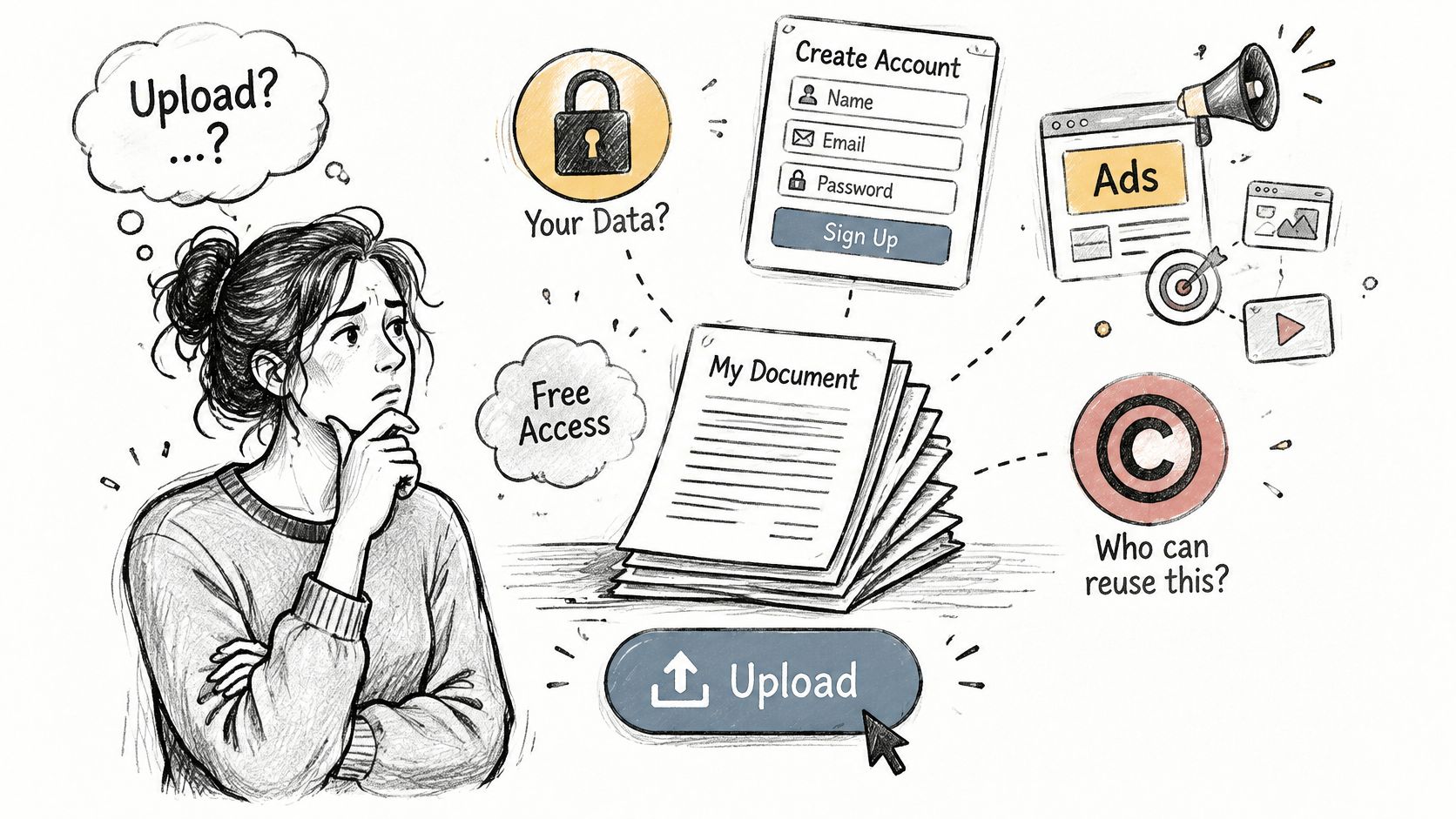
Free can cost you data rather than money. Before uploading a document, find out whether the service needs an account, displays advertising, retains your text, or claims rights to reuse it.
Privacy and ethical concerns are implementation barriers identified in the State of Voice AI report. For document conversion, the practical question is direct: who receives your text, and what can they do with it?

Check the upload path
- Processing location: Does conversion happen on your device or on a remote server? An installed app isn't automatically an offline app.
- Retention and reuse: Is uploaded text stored, used for model training, or shared with subprocessors?
- Account requirements: What identifying information must you provide, and can you use the tool without linking another account?
- Deletion: Can you delete individual uploads, and does account deletion also remove stored documents?
- Encryption: Does the service explain protection during transfer and storage?
- Retention period: Look for a stated period, not a vague promise to keep information only as necessary.
An unclear policy isn't proof of misuse, but it's a poor basis for uploading confidential material. I would choose verified local processing for unpublished research, medical documents, proprietary reports, or lecture notes containing personal information.
Separate permission from privacy
Privacy concerns who can access the document. Copyright concerns what you're allowed to do with it. Your own notes and a commercially protected ebook don't carry the same permissions, and a free converter doesn't grant additional rights.
Use cloud conversion for public material when you have permission to process it that way. Before handling a sensitive file, remove names, patient details, access tokens, unpublished findings, and internal figures from a separate working copy.
Redaction needs a final check too. Search the extracted text for the information you intended to remove, rather than relying on a black rectangle placed over the original page.
How to Convert Text to Audio in Seven Steps
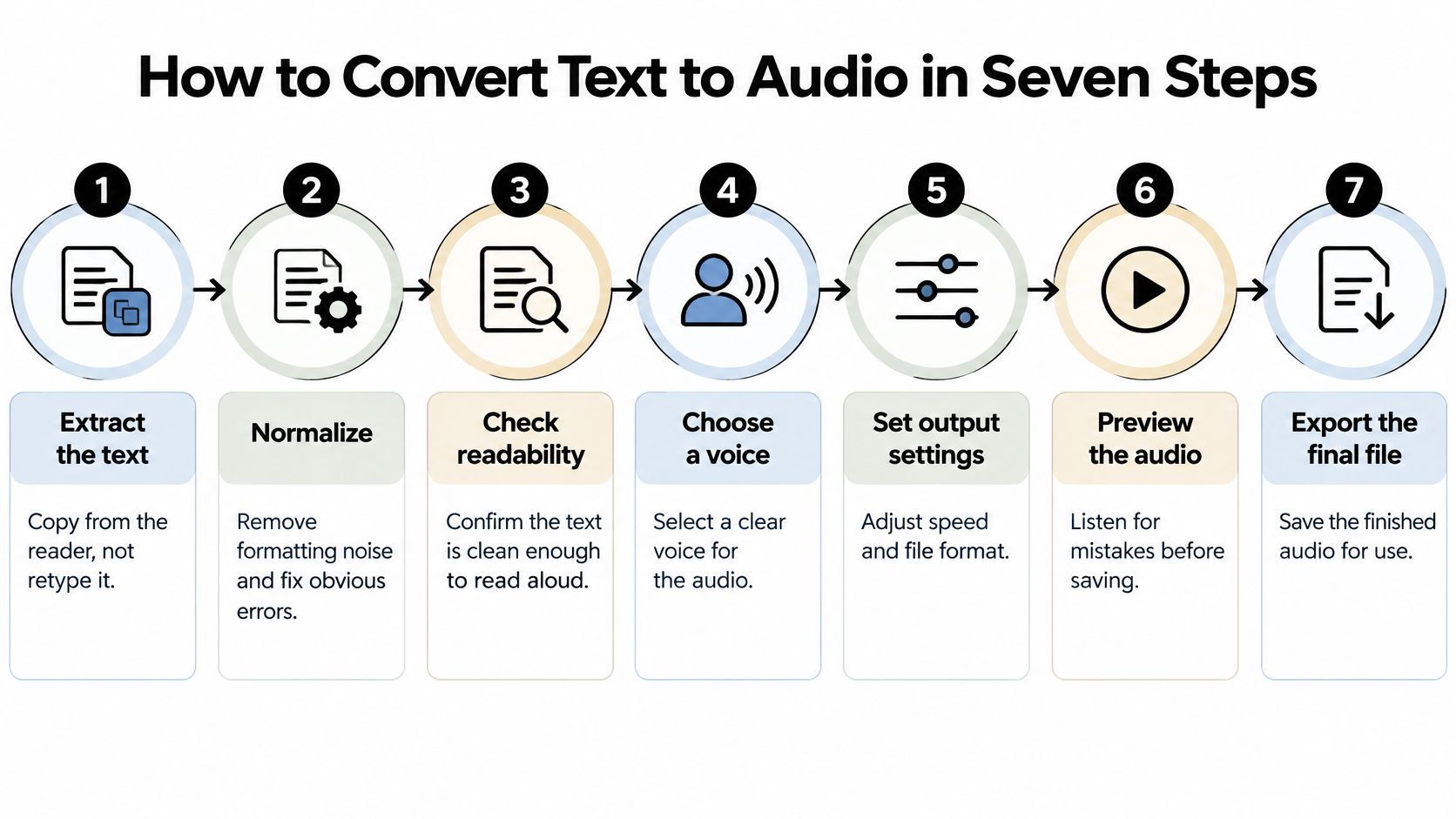
Treat conversion as quality control, not a single button press. Your job is to preserve meaning while changing the way someone receives it.
Before starting, inspect the free tool's stated limits on input length, file size, available voices, downloads, and permitted use. Don't prepare an entire study workflow around an export feature you haven't confirmed.

Prepare and generate
Extract the text. Copy from the document reader or use its text-export function rather than retyping. Keep the original beside your working copy so you can resolve missing symbols or broken passages without guessing.
Normalize the content. Remove repeated headers, unnecessary URLs, and formatting markup, then expand ambiguous abbreviations and units. Decide how dates and numbers should sound, especially where a compact written form could have different spoken interpretations.
Split at meaningful boundaries. Create separate chapters or headed sections instead of cutting wherever the input box fills up. Keep a list, worked example, or explanation together so the listener doesn't lose its context.
Choose the voice and language. Match the voice to the text's language and test it on specialist vocabulary, not just introductory prose. If a passage switches languages, prepare it separately when the reader can't switch reliably.
Synthesize each section. Use consistent settings and descriptive filenames that preserve the document's order. Separate outputs make it easier to replace a faulty passage without repeating a successful conversion.
Verify before exporting
Transcribe a representative sample. Run speech-to-text on generated audio and compare that transcript with your input, paying attention to names, dates, equations, and repeated terminology. Apply the same privacy precautions to the transcription service as to the converter.
Export after the sample passes. Listen while checking the source, then save in a format your intended player supports. Open the saved result in that player before treating the task as finished.
Word Error Rate, or WER, counts substitutions, deletions, and insertions, with lower values indicating fewer word-level errors, as explained in the TTS evaluation benchmark. It's useful for spotting changed wording, but it doesn't tell you whether a pause is confusing or a list is exhausting to follow.
A transcription mismatch is a prompt to investigate, not automatic proof that the synthesized speech is wrong. The transcription system can make mistakes too. Listen to the disputed passage and compare both outputs with the original.
A sample passes when the meaning survives listening, not merely when the voice sounds convincing.
Avoid testing only the first page. Choose material that includes the document's actual difficulties: citations, punctuation, headings, or technical terms. Correct names, clear paragraph pauses, and understandable lists matter more than a polished opening sentence.
Fixing Scanned Pages and Messy PDFs First
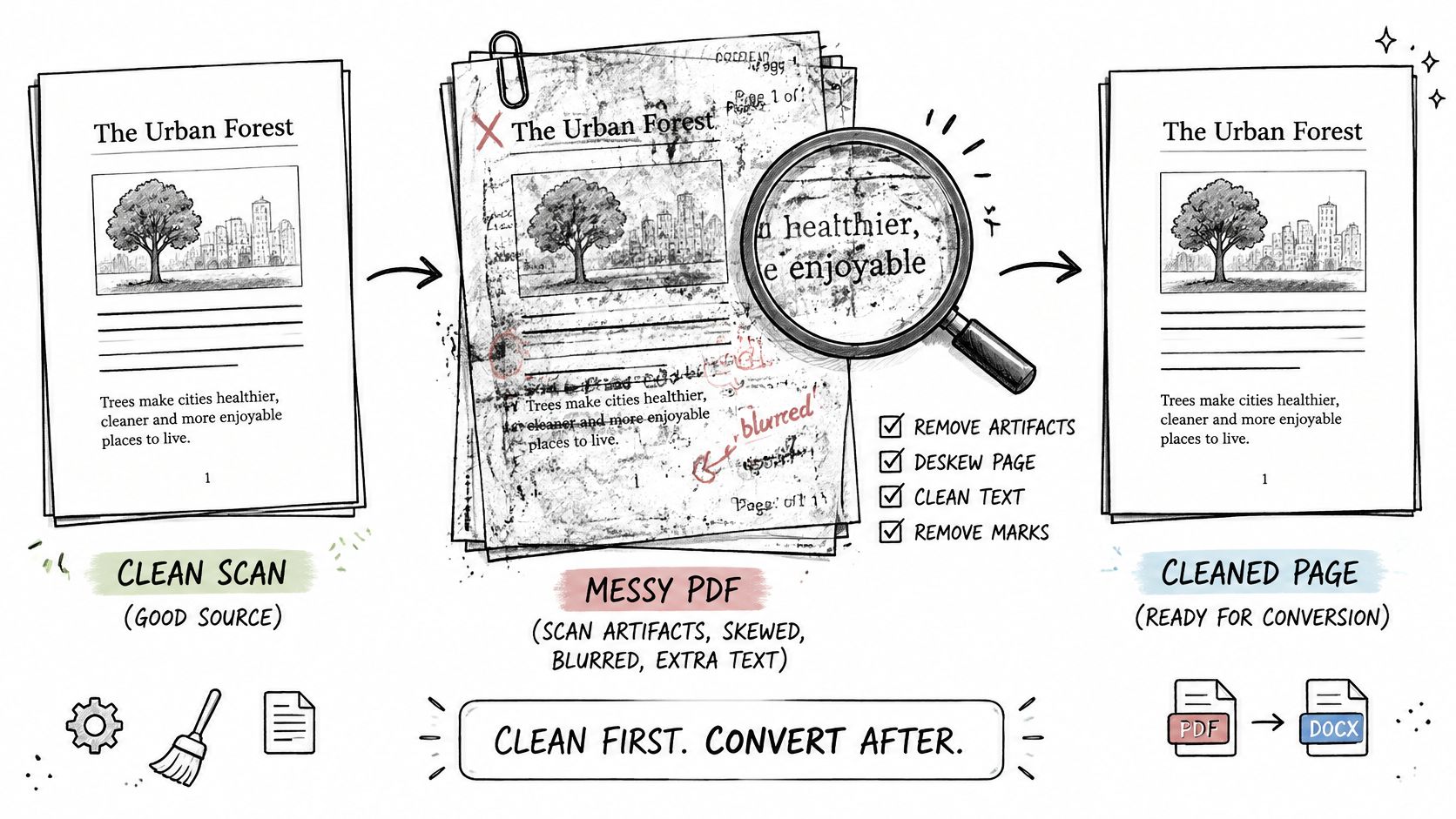
Scanned documents can introduce substantial errors before speech synthesis even begins. A large-scale evaluation of visually complex documents reported OCR WER values of 0.16–0.19, corresponding to roughly 70–80 word errors per page at the evaluation's median of 420 words per page.
Those errors aren't cosmetic. A missing negative can reverse a claim; an altered decimal can change a measurement. A fluent voice can make both mistakes harder to notice.

Repair the reading copy
Recognize every page. Run optical character recognition, or OCR, across the complete scan. Check for sideways pages, clipped margins, or blurred text before trusting the extracted result.
Preserve page order. Compare the document's sequence with the original, including inserts and appendices. A missing page may leave a grammatically plausible transition while removing essential context.
Remove repeated furniture. Delete headers, footers, and standalone page numbers from the listening copy. Rejoin words split across line endings, but preserve genuine compound-word hyphens.
Resolve layout-dependent content. Check columns, tables, captions, and footnotes individually. Decide whether to read each item, move it to a sensible point, or omit it from the listening copy without changing the argument.
Restore audible structure. Add punctuation where spacing or typography carried the meaning. Convert a table into labeled statements when a stream of disconnected cells would be unintelligible.
Compare distributed test exports. Listen to passages from the beginning, middle, and end while viewing the corresponding pages. This catches changes in scan quality and layout that an opening-page test misses.
Prioritize meaning over appearance
For a table, preserve the relationship between labels and values. Rather than letting the reader announce every cell in sequence, write a listening version that identifies the row and its relevant result. Keep the original table available for detailed reference.
Equations need similar care. If the tool can't speak the notation unambiguously, add a faithful verbal explanation or mark the passage for visual review. Don't replace a difficult expression with an approximation.
Save the repaired text by heading so an error can be corrected locally. Keep a separate source copy, especially when pronunciation spellings or spoken descriptions differ from the printed wording.
Finish with dates, decimal numbers, abbreviations, and unfamiliar proper nouns. These deserve deliberate comparison because incorrect versions can sound perfectly ordinary.
Converting Kindle Books You Own
Start with permission: use books you own or are licensed to read, and stay within the applicable license and law. Don't strip DRM or copy protection to manufacture an input file. Ownership of a reading copy doesn't automatically authorize redistribution of its text or generated audio.
Check the read-aloud or accessibility options available for the title on your device or app. Narration availability can differ across reading setups, so establish that the actual book works before planning a long listening session.
Test beyond the front matter
Use a chapter containing ordinary body text and footnotes, not just the contents page. Confirm the following:
- Chapter navigation: The heading is announced and you can move to another chapter deliberately.
- Footnote behavior: Notes are skipped or spoken consistently, without interrupting sentences unpredictably.
- Reading position: Closing and reopening the app returns you to a useful location.
- Non-text content: Tables and illustrations aren't treated as though they contain no information.
A pleasant voice won't compensate for losing your position whenever you stop listening. For study, reliable navigation may be more valuable than expressive narration.
If the title won't narrate through your available setup, use a licensed alternative such as a DRM-free EPUB, an authorized audiobook, or your own notes. Choose a permitted route rather than a copy-protection workaround.
Picking a Voice, Speed and Export Format
Choose a voice with a demanding passage. Include a personal name, a date, specialist vocabulary, and a sentence with a negative. Compare available voices using exactly that text so you're judging pronunciation and rhythm rather than different material.
For dense study notes, I would favor clear articulation over dramatic expression. A lively voice may suit fiction, while an understated voice can make technical explanations easier to follow without distracting emphasis.
Set speed for the listening task
Start unfamiliar material at the normal rate. Increase speed for review only when you can still distinguish numbers, qualifications, and words such as not or unless.
Paragraph breaks matter as much as rate. If the reader runs a definition into its example, restore punctuation or separate the passages instead of slowing the entire document.
Match the voice to the language of the text, not the interface. For multilingual material, isolate passages that the selected voice pronounces poorly and give them appropriate language settings.
Choose where you'll listen
| Listening situation | Practical choice | What to verify |
|---|---|---|
| Car or standalone audio player | A compatible exported audio file, such as MP3 | The saved file opens and plays completely |
| Study with frequent stops | In-app playback with navigation controls | Position recovery and bookmarks work |
| Travel without reliable connectivity | Downloaded audio or verified offline playback | Playback works with the connection disabled |
Don't assume that downloading an app also downloads its voices or your documents. Test offline access before leaving, and check whether the player remembers your place after closing.
Keep the settings that passed your test consistent across the document. Change them only for a clear reason, such as a language switch, rather than letting successive sections use accidental defaults.
Fixing Skipped, Garbled or Flat Audio
Numbers and dates read wrongly deserve immediate attention because they can change meaning without making the voice sound broken. Replay the affected passage against the source before deciding whether the fault lies in recognition, pronunciation, or playback.
Audio problems, causes and fixes
| Symptom | Likely cause | Fix |
|---|---|---|
| Numbers or dates read wrongly | Recognition error or unexpanded abbreviation | Write dates and units out in full, then regenerate that section |
| Sentences cut off mid-thought | Page breaks or hyphenated words not joined | Remove page-number lines and rejoin split words before synthesis |
| Two columns read as one jumble | Reading order taken from the page layout | Export a column at a time or reorder the text by hand |
| Flat, robotic pauses | Long unbroken blocks with little punctuation | Split at headings and add punctuation at natural breaks |
| Names or terms mispronounced | Unknown proper nouns or specialist vocabulary | Use a pronunciation setting if available, or respell the term in a test copy |
| Audio stops partway through | File length or size limit reached | Split the document into parts below the tool's stated limit |
Review comprehension and navigation
The DAISY accessibility survey findings describe improvements in synthetic-voice quality and accessible-format creation while identifying continuing challenges with integration, technical expertise, and privacy. Better speech alone doesn't resolve whether someone can use a document effectively.
For an after-export review, sample section openings, the most technical passage, and a list or citation block. Check whether headings are distinguishable, references interrupt the explanation, and specialist terms remain recognizable. Include equations, multilingual passages, and content associated with tables when those appear in your document.
Acceptance check: Can you stop, return later, and recover both your location and the thread of the explanation?
A natural cadence doesn't establish factual accuracy. Recognition mistakes can become smooth speech, while omitted captions or footnotes may leave no audible sign that anything is missing.
Regenerate the affected section after making a targeted correction. For pronunciation problems, keep phonetic respellings in a listening copy rather than changing the scholarly source text.
If the converter still skips content after a clean input test, try another reader rather than repeatedly adjusting punctuation. The deciding question for work or study is whether an unnoticed omission would change your understanding. If it would, keep the source available and don't rely on audio alone.
Start Your Free Test Today
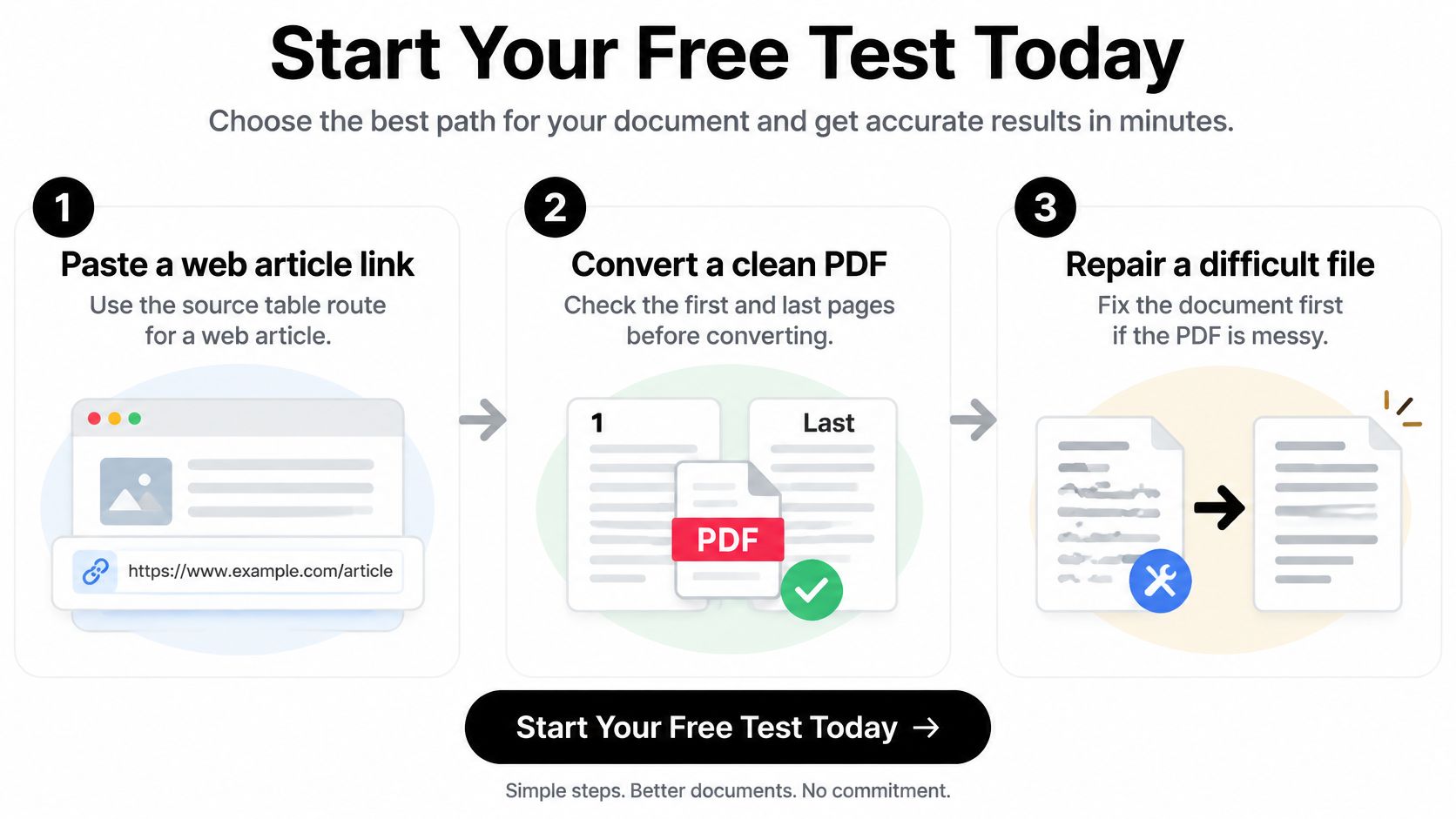
Choose a document you already need to read, then take the shortest suitable route. Paste a public article link into a reader, open a clean PDF directly, or repair a scanned page before generating speech. Don't begin with your largest or most confidential file.

Make a small decision before a large conversion
Use a passage that represents the work ahead. If your document contains technical terms, choose technical text; if it contains footnotes, include a footnote. A successful test should demonstrate the features you need, not merely show that the play button works.
Before sending anything private to a server, establish that the processing arrangement is suitable. If you can't establish that, switch to verified local processing or choose a non-sensitive document for the test.
For mixed-source reading, TTS Pro has a free version you can try with your own material. We support text, ebooks, PDFs, EPUBs, TXT files, and web pages, and our smart scan technology can turn printed books and notes into audio.
Compare the result with the source before committing the rest. Keep the voice and speed that worked, retain your cleaned text, and name sections so you can replace an imperfect output without starting over.
Your next action is simple: select a representative passage today, generate a short sample, and listen with the source open. Convert the remainder only when the words, structure, and playback controls meet your needs.
Our text-to-speech reader offers a free version for turning documents, web pages, and printed text into listening material. Visit TTS Pro and try a passage from something you need to read today, then check the audio against the original before converting the full file.


No Comments
Leave a comment Cancel