
The most popular advice about text to speech for students is also the least useful: turn it on, increase the speed, and get through more reading. Finishing a chapter isn't the same as learning it. A better question is what can you explain tomorrow, without the recording or your notes?
Text to speech converts written material into spoken audio. Used thoughtfully, it can help you access difficult reading and make review more manageable. But the strongest study routine still asks you to pause, question, write, and check your understanding. Treat audio as a partner to active reading, not a substitute for it.
Table of Contents
- Which Study Materials Convert Well and How to Import Them
- How to Set Up Text to Speech for Study Sessions
- Test Whether Audio Improves Your Recall
- Active Listening and Spaced Review Routines
- Fixing Scans, Names and Equations Before Studying
- Accessibility Uses for Students Who Need Audio
- Start Your First Audio Study Session Today
Which Study Materials Convert Well and How to Import Them
Start by matching your material to an import method. The check matters as much as the upload: a file that opens successfully can still play in the wrong order or leave out important content.
| Material | How to import | Check before studying | Common snag |
|---|---|---|---|
| Typed notes or lecture summary | Paste text or save as TXT | Headings and bullet markers read cleanly | Symbols and abbreviations read oddly |
| Textbook or lecture PDF | Open the PDF directly | Text is selectable | Scanned pages come out garbled |
| Printed handout or book page | Use the in-app scan | Pages read in order | Two columns merge into one line |
| Web article or journal page | Paste the link | Menus, captions and banners are skipped | Navigation text read aloud |
| EPUB or TXT book | Open the file | Chapter breaks are present | Chapter markers missing |
| Kindle book you own | Check the Kindle option in the app | Chapter order matches the book | Title does not load |
| Equations and data tables | Paste a plain-text version | Formulas written out in words | Symbols skipped or misread |
Match the import to the document
Typed notes are the easiest starting point because you can edit the source directly. Expand abbreviations that sound confusing and replace decorative bullet symbols if the reader announces them between every sentence.
For a PDF, try selecting and copying a paragraph before importing it. Selectable text is a useful first check, although it doesn't guarantee that footnotes, columns, or headings will play correctly.
A printed handout needs optical character recognition, usually called OCR, to turn the page image into text. After scanning, compare the extracted text with the page, especially where a sentence continues into another column.
With web articles, listen past the title and into the body. If the reader includes subscription prompts or navigation menus, paste the article text you're permitted to use into a clean document instead.
EPUB and TXT files deserve a chapter-boundary check. EPUB files may preserve navigation, while a TXT file needs clearly written headings to make sections easy to find.
For Kindle books, confirm that your chosen reader supports the title and account connection. Owning a book doesn't mean every reading application can import its file directly.
Equations and tables need more preparation than continuous prose. Keep the original visible and create a spoken companion that names variables, units, and relationships rather than relying on symbols alone.
Before committing: Test a short sample from the beginning and a complicated passage from the middle. Don't load an entire chapter until both make sense aloud.
How to Set Up Text to Speech for Study Sessions
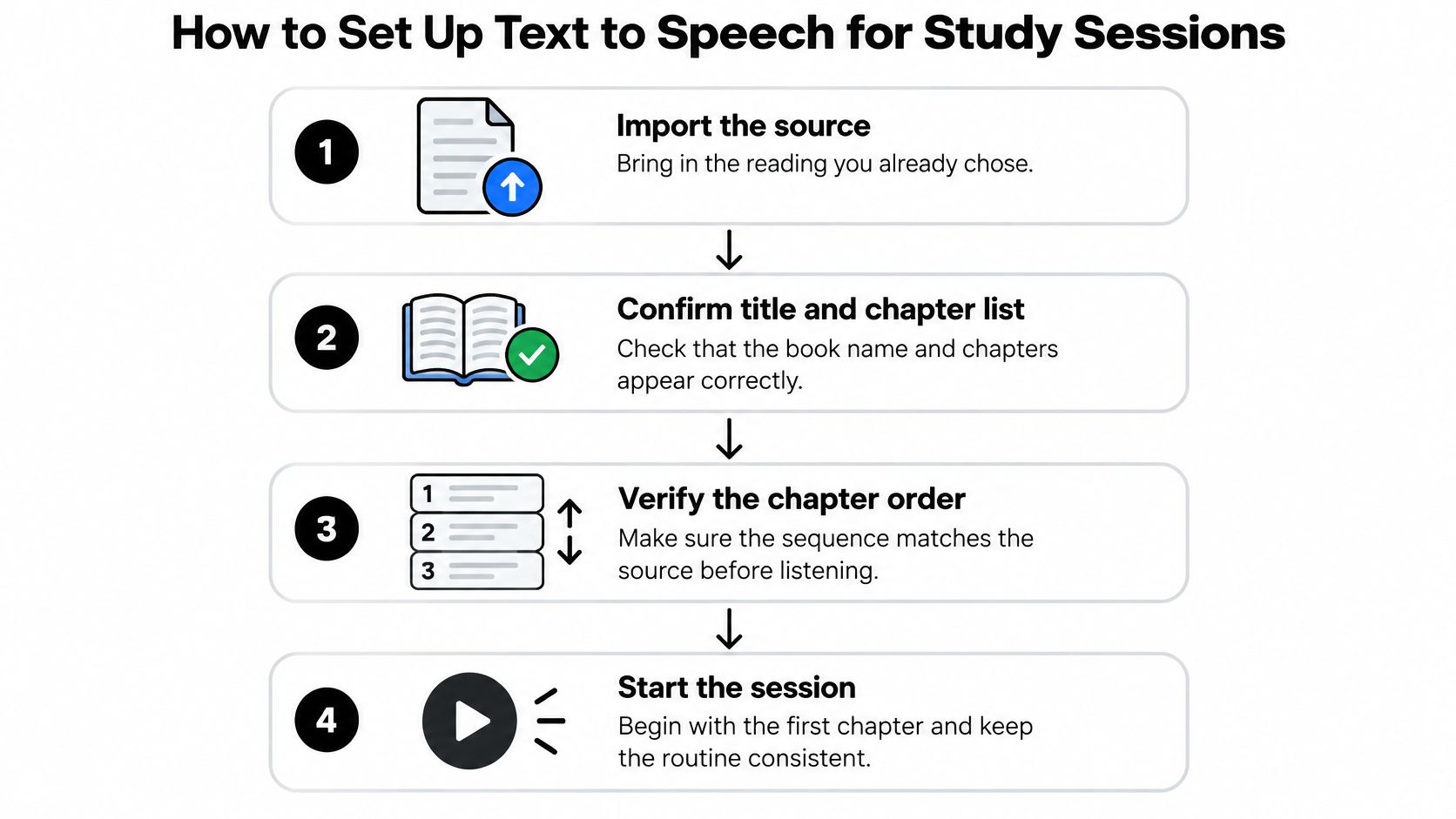
Build a routine you can repeat without exploring every setting before each assignment. The essentials are a verified source, comfortable playback, and a reliable place to stop.

Make the listening environment usable
Import and verify the source. Confirm the title, chapter list, and chapter sequence against the original document before pressing play. If navigation is missing, split the reading into clearly named sections so you don't have to search through an uninterrupted recording.
Choose a voice using actual course material. Compare available voices on the same paragraph, preferably one containing unfamiliar vocabulary. Choose the voice whose phrasing you can follow without repeatedly interpreting its delivery, rather than the one that sounds most impressive in a demonstration.
Begin at the reader's normal speed. For unfamiliar material, slow down whenever you can't explain a sentence after hearing it. Increase the pace for familiar review only if you can still state the main idea and distinguish closely related terms.
Enable synchronized highlighting if available. Follow the spoken words on screen and check whether the highlight stays aligned with the narration. If visual tracking feels distracting, try a cleaner text display or follow at paragraph level instead of forcing yourself to watch each word.
Make stopping and returning easy
Divide the reading at meaningful boundaries. Use a section heading, worked example, or change in argument as a stopping point. A section that contains a complete idea is easier to summarize than a chunk cut off halfway through an explanation.
Run a pronunciation check. Listen to a passage containing course terminology, abbreviations, and any names you'll need to recognize in class. Mark unclear words for correction, and keep a written vocabulary list when hearing the pronunciation alone doesn't establish the meaning.
Save an organized study queue. Name documents or playlists by course, topic, and assignment so similar files don't become interchangeable. Where your reader supports it, save playback settings and bookmarks; otherwise, keep a brief setup note beside the file.
A workable setup lets you pause at a heading, find the corresponding paragraph, and resume without guessing where you were. Check this before settling into a long session. A beautiful voice won't compensate for losing your place whenever you stop to think.
If your reader supports exporting or downloading audio, test an offline chapter before relying on it during a commute. Some readers keep files inside the app rather than exporting them, so verify the actual workflow instead of assuming a download button creates a portable audio file.
Keep the original document accessible during your first study session. You'll need it for diagrams, citations, spelling, and passages where the spoken version leaves an ambiguity unresolved.
Test Whether Audio Improves Your Recall
The answer is not just that audio works or doesn't work. An analysis of the 2017 eighth-grade NAEP mathematics assessment found that TTS use was positively associated with item performance for students with disabilities and English learners receiving extended time, but not for general-education students or students without those accommodations. An association isn't proof that audio caused better performance, and an assessment finding doesn't establish how you should study every subject.
Use a small personal comparison to find a workable starting point. This isn't a diagnostic assessment or a basis for removing an accommodation.
Compare methods on comparable material
Choose chapters or sections with similar length, difficulty, and familiarity. Avoid testing silent reading on introductory material and audio on a technical chapter, because you won't know whether the method or the content caused the difference.
| Condition | What you do | What you measure |
|---|---|---|
| Text only | Read the chapter silently at your normal pace | Delayed recall score and minutes spent |
| Audio only | Listen with the text closed | Delayed recall score and minutes spent |
| Audio plus text | Follow highlighted text while listening | Delayed recall score and minutes spent |
| Audio with pauses | Stop at brief, regular intervals to summarize aloud | Delayed recall score and total time taken |
For a practical trial, use a next-day recall check. Write questions before studying, ideally with an instructor or study partner, and answer them without reopening the material. Include the main claim, an explanation, an application, and a distinction between concepts, rather than testing only vocabulary recognition.
Keep the questions and scoring rules comparable across conditions. Record total study time, including pauses and notes, along with distractions, fatigue, or prior knowledge that might explain an unusual result.
Make a decision from a pattern
Repeat the comparison on fresh, comparable material instead of choosing a winner after a single attempt. There's no universal score gap that makes this informal exercise scientifically conclusive.
- Audio plus text gives stronger recall: Use that combination for similar reading, then check whether the advantage continues.
- Audio only preserves recall with less effort or time: Consider it for familiar material and convenient review.
- Audio feels easy but recall drops: Add visible text, summaries, or shorter sections before increasing playback speed.
- Results fluctuate: Keep testing and examine document difficulty, interruptions, and question quality.
Judge the result, not the feeling: A fluent recording can feel familiar while leaving you unable to explain the argument.
Don't count uninterrupted listening as evidence of comprehension. Count what you can retrieve later, and keep a separate note about effort, because accessibility and stamina matter alongside a quiz score.
Active Listening and Spaced Review Routines
Pressing play doesn't tell you whether a student is making sense of the text. A 2025 single-subject study of five students with mild intellectual disability found that TTS improved comprehension and independence for some learners but offered minimal or no benefit for others. That variation is a reason to adapt the routine, not to assume a student has failed to use the tool correctly.
Listening should produce something you can inspect: an explanation, a question, a sketch, or a summary. Otherwise, it's difficult to distinguish understanding from merely staying near the sound.
Give yourself a task while listening
Pause at a meaningful heading and explain the main point aloud. Use your own language instead of repeating the last sentence. If your explanation is vague, locate the passage that would make it more precise.
Ask a question that requires an explanation. For a biology chapter, ask why a process changes under different conditions, not just what the process is called. Answer before checking the text.
Write brief notes from memory. Put the central claim, supporting detail, and any uncertainty on paper, then compare them with the source. Correct missing relationships, not just missing words.
Return later with retrieval before replay. Try to explain the topic before hearing it again. Use the recording to repair a specific gap instead of replaying everything automatically.
Use a flexible review calendar
The following is an example schedule, not a tested prescription or a requirement. Move reviews around your course timetable and spend longer where recall is weak.
| Review point | Task | Time |
|---|---|---|
| Same day, within an hour | Listen once, pausing at headings to summarize | One manageable section |
| Day 1 | Recall three key ideas from memory, then check the audio | 10 minutes |
| Day 3 | Replay only the sections you couldn't recall | 10 minutes |
| Day 7 | Quick audio pass plus two self-written questions | 10 minutes |
| Day 21 | Listen to your own summary track only | 5–10 minutes |
Separating review sessions gives you opportunities to find out what remains available without immediate prompting. Start each return with an attempt to remember, even if that attempt feels less comfortable than replaying a familiar explanation.
Walking or cooking can be useful settings for reviewing familiar material, provided the activity is safe and doesn't demand your full attention. Save new, conceptually difficult reading for a setting where you can stop and examine the source.
If you reach a heading and can't name what the preceding passage was about, stop playback. Reopen the text and work through the unclear paragraph before continuing.
Fixing Scans, Names and Equations Before Studying
A scanned PDF that produces disconnected fragments needs repair, not a slower voice. If OCR has captured the wrong words or reading order, replaying the result only rehearses the error.
Implementation deserves attention alongside voice quality. A 2025 high-school iPad study described limited teacher experience with built-in TTS and continuing technical and professional-development needs, despite reported benefits in confidence, independence, and participation.
Repair the source before the sound
- Garbled scans: Straighten the page, improve lighting, remove shadows, and rescan at a clearer resolution. If the source is a blurred photocopy, seek an accessible digital edition from the instructor, library, or publisher rather than repeatedly processing the same poor image.
- Merged columns: Crop and scan each column separately, or copy recognized text into a document in the correct order. Check sentences that cross page boundaries, where headers and footers can interrupt the argument.
- Mispronounced names and terms: Use a pronunciation dictionary if your reader offers one, or make a phonetic substitution in a separate listening copy. Confirm personal names with the person or an authoritative pronunciation rather than assuming a spelling-based guess is correct.
- Missing equations: Write the expression in words, including brackets, exponents, and units where they affect meaning. For example, render a circle equation as x squared plus y squared equals r squared, while retaining the original notation for solving problems.
- Confusing tables: State the column headings, then describe each relevant row with its labels and units. A string of spoken numbers without labels isn't a usable substitute for the table.
Protect the session and the document
For dropped playback, try a shorter section and an offline copy where supported. Check that the downloaded version plays without a connection before you leave a reliable network.
Ask the instructor about headphone use during teaching, discussion, or laboratory work. Choose an arrangement that preserves access to instructions and safety information; an earbud isn't appropriate in every environment.
Keep sensitive research notes in an approved workflow. Before uploading course readings, participant information, or unpublished work, check institutional policy, permissions, and the reader's handling of uploaded files.
Finally, test each repair on a sample page. Compare the spoken version against the original, including a difficult line, before converting the remaining chapter.
Accessibility Uses for Students Who Need Audio
Say a student understands a history discussion but struggles to access the assigned chapter independently. Audio may provide a route into the same content, while the student continues any separate reading instruction or support they need. That's an access question, not a question of whether they've earned an easier assignment.
The scale of educational support is substantial: according to the U.S. Government Accountability Office, as reported by K–12 Dive, 7.5 million U.S. students received services under the Individuals with Disabilities Education Act in the 2022–23 school year, and text to speech is among the assistive technologies used to support students.

Ask for a usable arrangement
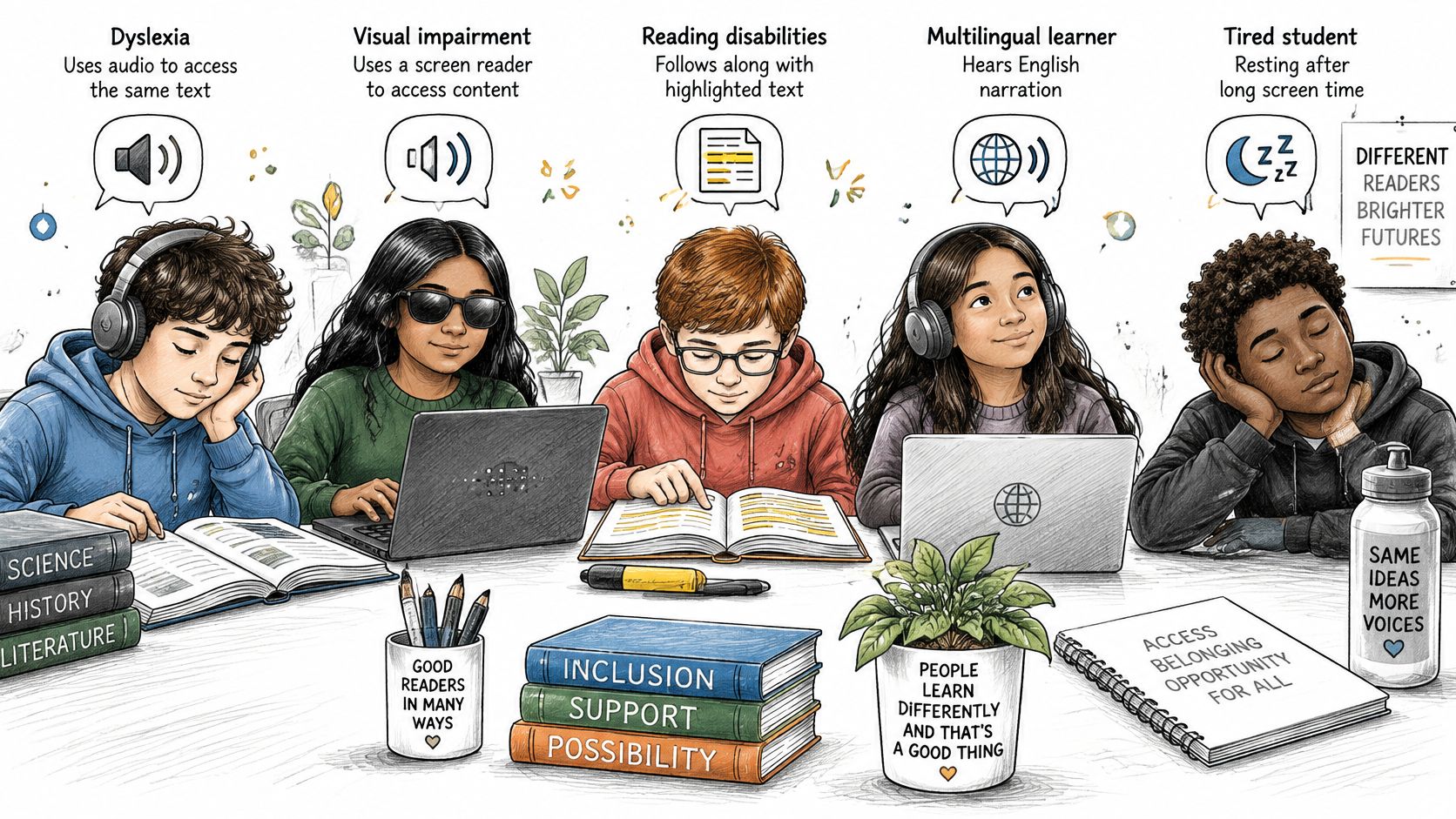
A student with dyslexia, a visual impairment, another reading disability, a language barrier, or screen fatigue may need different settings and support. Don't assume everyone who needs audio also needs highlighting, or that an attractive interface works with their other assistive technology.
- At school: Ask the IEP or Section 504 team to discuss read-aloud access, supported formats, and the circumstances in which it may be used.
- At college or university: Contact disability services about the institution's accommodation process and accessible course materials.
- Before an assessment: Confirm the approved tool, functions, and testing arrangements in writing with the appropriate staff.
Study access and examination permission aren't interchangeable. Unapproved audio use during a test may raise an academic-integrity concern, so resolve uncertainty before the assessment.
Verify accessibility rather than assuming it
Check keyboard operation, screen-reader compatibility, navigation, and any other functions you depend on. Our developer hasn't yet indicated which accessibility features the app supports, so don't treat a general reading feature as a verified accommodation capability.
Bring examples of the barrier, the document, and the proposed workflow to the relevant team. Personal recall notes can inform that conversation, but they don't replace the team's decision or establish the scope of approved use.
Start Your First Audio Study Session Today
Choose a chapter you need to learn this week, not a disposable sample. Pick its import method, check the conversion, and prepare recall questions before you listen. Use comparable sections for your method comparison rather than studying the same passage repeatedly and mistaking familiarity for an advantage.
Keep a simple record of the method, your later answers, and anything that interrupted the session. Choose a provisional default for that material, then revisit it when the subject, document format, or workload changes. You're looking for a dependable study practice, not a permanent label such as auditory learner.
Our TTS Reader Pro app converts text, eBooks, PDFs, EPUB and TXT files, and web pages into speech. Smart scan technology also turns printed books and notes into audiobooks, and we offer a free version for trying the workflow before paying.
If you're exploring an accommodation, take your observations to your instructor or disability office as useful context, not a verdict about what support you deserve. Fast listening that produces no recall isn't progress. Start with a manageable reading assignment and make tomorrow's explanation your measure of success.
At TTS Pro, we offer text-to-speech conversion and smart scanning so you can try audio with both digital readings and printed study material. Visit us to test the free version on a course reading, then check what you can explain without pressing play again.


No Comments
Leave a comment Cancel