
The chapter is open on the kitchen table and it has been open for forty minutes. Your child has read the first page three times and can tell you what the words are, but not what the paragraph said. The rest of the class finished that chapter in a lesson and moved on to the questions.
So you try the audiobook. Some nights it works and the homework gets done. Other nights the chapter plays to the end, the blank look is still there, and you start wondering whether listening is a shortcut that's making the reading worse.
Neither reaction is quite right. Audio does one specific job extremely well and another one not at all, and once you can tell those apart, every setup decision gets easier. What follows is the honest version of what audiobooks for dyslexia can fix, what they can't, and how to set the controls so the listening earns its place.
Table of Contents
- Where Audiobooks Help Readers With Dyslexia Most
- What the Research Says About Listening and Comprehension
- Audio Features That Make Comprehension Easier
- Audio Formats and Tools That Keep Text and Sound Together
- Build a Listening Routine and Fix the Failures
- Choose Your Audiobook Setup for Dyslexia
Where Audiobooks Help Readers With Dyslexia Most
Say a Year 9 student opens a history textbook at seven in the evening. Forty minutes later they've decoded one chapter and can retell about half of it. A classmate read the same chapter in twelve minutes and spent the rest of the lesson on the questions.
That difference is a decoding bottleneck, and it's the one thing audio removes cleanly. Listening skips the letter-by-letter assembly and delivers the content at roughly the pace the rest of the class gets it. What listening doesn't do is confirm that the meaning landed. Access and understanding are two different jobs, and they need two different setups.
Here's how the common reading goals sort out.
| Reading goal | How much audio helps | Main limit |
|---|---|---|
| Following a class novel or set text | High: content is accessible at grade level | Plot and vocabulary still need checking |
| Reviewing lecture notes or study guides | High: notes replay for repeated review | Notes must be clear enough to follow by ear |
| Reading long reports or articles | High: reduces fatigue from decoding | Complex tables and figures do not translate well |
| Reading for pleasure | High: restores enjoyment of books | Little effect on decoding skill |
| Learning spelling or decoding | Low: audio does not teach letter-sound patterns | Needs phonics or structured literacy teaching |
| Understanding dense academic text | Moderate: helps access, not comprehension alone | Pair with text tracking and comprehension questions |
The rows people misread
Reading for pleasure and learning spelling sit at opposite ends of the table, and both surprise families. Audio restores the pleasure of a story because the story stops depending on a skill that's still under construction. It does almost nothing for spelling, because spelling needs letter-sound patterns, and hearing a word doesn't teach you which letters build it.
Dense academic text is where most confusion starts. Audio gets a reader through a journal article or a textbook chapter, but the comprehension gain is moderate and it evaporates when the reader listens once, passively, with nothing in front of them. The same chapter with the page open, a finger tracking the line, and three questions at the end behaves completely differently.
Lecture notes and study guides are the row students underuse. A set of notes read aloud twice on a walk is real revision, provided the notes are written in full sentences. Abbreviations and arrows that make sense on paper turn into noise in your ears.
Let the goal pick the setup
Ask which reading goal takes the biggest share of the week. For a Year 9 student with a set text, it's the class novel, and that row demands synced text on screen so the eyes and ears stay on the same words. For an adult studying for a professional qualification, it's usually long reports, where audio cuts the fatigue of decoding but tables and figures still need eyes.
Whichever row wins sets the format, the speed and the follow-up work. The other rows can wait until the first one is running smoothly.
A student who listens to the set text has read the set text. Audio isn't a reward for finishing the print version and it isn't cheating.
What the Research Says About Listening and Comprehension
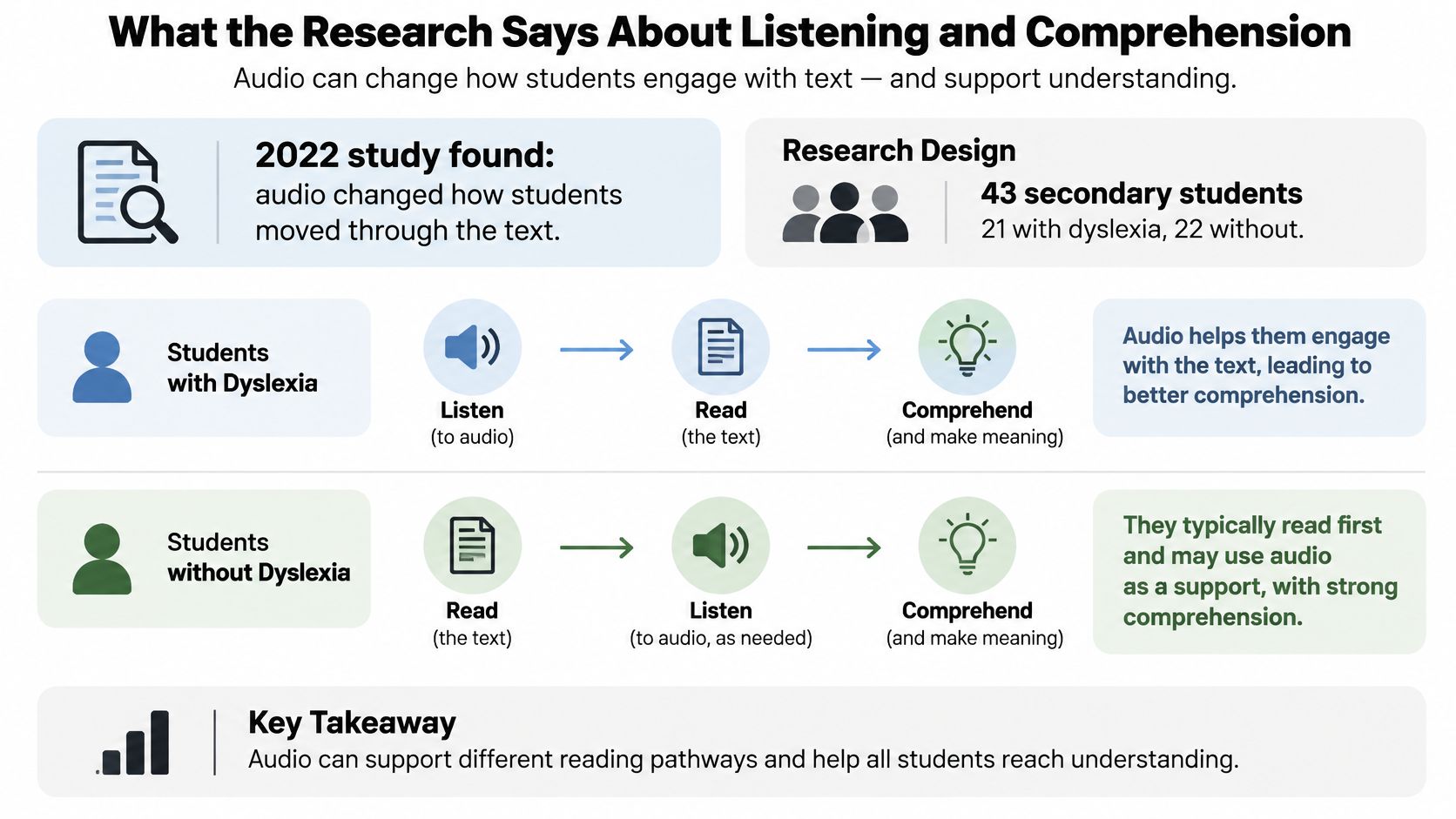
A 2022 study gave 43 secondary-school students, 21 with dyslexia and 22 typically developing, texts to read with and without audio support, and tracked both how they read and what they understood (the study record on APA PsycNet).
The results split neatly in two, and the split is the whole story.

What the audio changed
Two things moved. Students distributed their attention more evenly across the entire passage instead of camping on one section and rereading it. Reading time also increased in most tasks, for students with dyslexia and without it, which suggests the audio kept them in contact with the text for longer.
That's a real gain. A reader who spreads attention across a whole chapter is doing what a reader is supposed to do, and the students who need that most are the ones who usually stall on page one.
What the audio didn't change
Comprehension scores did not improve in either task, for either group. The students read differently and still understood the same amount.
This is the finding that resets expectations. A ramp gets a wheelchair user into the building, but the ramp doesn't build leg strength. Audio gets a dyslexic reader into grade-level content, and it doesn't train the reading muscles that comprehension work builds. Schools and parents who treat an audiobook as a cure end up disappointed at exactly the point where they should be adding something else.
Audio widens access; it does not automatically build comprehension.
What access is worth
Getting through a Year 9 history chapter in fifteen minutes instead of forty isn't a small thing. It means the student reaches the discussion with the class, hears the subject vocabulary spoken correctly, and can answer questions about content they encountered. Comprehension work then has something to work on.
Judge audio by whether it brings grade-level material within reach. Then attach the things that build meaning: explicit instruction in reading strategies, tracking the words on the page with a finger or a highlight, vocabulary cards for the words the chapter keeps repeating, and a short comprehension check after each section.
A parent who asks "did the audio help?" is asking the wrong question. The useful version is "did the audio get them to the content, and what did we do with it next?"
Audio Features That Make Comprehension Easier
The strongest number in the audio research isn't about apps. It's about voice quality. A meta-analytic result reported in a review of assistive reading technology found a statistically significant effect size of 0.35 for read-aloud and text-to-speech accommodations on reading comprehension among students with reading disabilities, and human-read audio produced an effect about 50% greater than synthetically narrated audio.
Read that second part again if you're about to buy a subscription. The narration is part of the intervention, not the packaging. A flat, rushed voice is harder to follow than a clear one, and the evidence points the same way.
Start with the voice, then adjust
The same body of work includes a study of 104 students with reading and writing disabilities or dyslexia, from middle school through the first year of high school, who valued audiobooks and built-in read-aloud functions for ease of use and their perceived contribution to comprehension across school subjects. Learners notice the difference even when a test doesn't capture it.
So play a sample before you commit. Two minutes tells you whether a voice pronounces your subject's vocabulary correctly and whether you can stay with it for twenty minutes.
Practical rule: change one setting at a time. If you slow the speed, shorten the section and switch the voice in the same session, you won't know which change did the work.
The controls that earn their place
| Feature | What it does | Starting setting |
|---|---|---|
| Narration style | Sets clarity and natural pacing | Test a human-read sample if available; otherwise a clear, slow AI voice |
| Speed control | Lets listeners slow dense passages | 0.9x to 1.0x for a first pass on new material, 1.2x for review |
| Text highlighting | Shows the word being read | Keep on for the first reading |
| Bookmarks and resume | Returns to the exact place after a break | Turn on for chapters over 20 minutes |
| Pronunciation settings | Corrects names and technical terms | Adjust before listening to key chapters |
| Voice choice | Changes pacing and tone | Pick one voice and keep it for each book |
Speed carries more weight than any other slider, and many listeners set it too high too early. A first pass through unfamiliar material belongs at 0.9x to 1.0x. Save 1.2x for the second pass, when you already know the shape of the argument and you're checking what stuck.
Highlighting is the feature that connects listening back to print. With the text on screen and the current word lit up, the reader sees the word and hears it at the same moment, which is what builds the sight vocabulary that decoding practice aims at.
Bookmarks and resume matter more than they sound. A chapter that runs past twenty minutes will get interrupted, and a reader who loses their place twice stops opening the file.
A test case you can run tonight
A biology chapter on the cardiac cycle is a good first trial. Open it at 0.9x with highlighting on and the textbook page visible. That's pass one.
Tomorrow night, review the same chapter at 1.2x with no page, just listening. If the second pass is where the confusion appears, drop back to 1.0x and keep the page open. Adjust pronunciation for terms like systolic before the key chapter, not during it, and don't switch narrators mid-book: a new voice costs you the thread you built.
Audio Formats and Tools That Keep Text and Sound Together
Format decides whether you can follow the words. That's the first decision, and it's the one people skip.
The rule is simple. If you need to read along, choose a format that keeps text on screen next to the sound. If you only need to review, choose the file that plays anywhere without fuss.
| Format | Best for | Text sync | Main caveat |
|---|---|---|---|
| MP3 or M4B audiobook | Listening on the go | No | No text to follow or search |
| EPUB with read-aloud | Following along in a novel | Yes, in supporting apps | Depends on publisher and app support |
| PDF converted to speech | Textbooks and reports | Partial, by page | Columns, tables and scans read poorly |
| TXT file | Notes and plain text | Yes, if the app highlights | Loses headings and formatting |
| Web article link | Articles and research pages | Varies | Menus and adverts can be read unless removed |
| Printed page scanned to audio | Handouts and printed books | Depends on app | Scan quality decides accuracy |
What each format is actually good for
MP3 and M4B are the commuter's format: one file, chapters inside, no screen needed. Perfect for a novel on the bus and useless for a chapter you have to quote in an essay, because there's no text to search.
EPUB with read-aloud is the closest thing to reading while listening, and whether it works depends on the publisher and the app. A novel from a major publisher usually plays nicely; a locked-down textbook may not.
PDF converted to speech works well only when the PDF has a clean text layer. A photo of a page, a two-column journal layout, or a table of dates reads badly, and the narration will stumble over running headers and page numbers. Convert the digital download, not the photocopy.
TXT files convert in seconds and lose every heading, bold word and table. Fine for notes, poor for a textbook chapter.
Web article links suit research reading, though site menus, cookie notices and advert text get read aloud unless you strip them first.
Scanning a printed page covers handouts and library books the school never provided digitally. Scan quality decides accuracy, so lay the page flat, shoot straight on in good light, and keep the spine shadow out of the middle.
One tool that covers the mixed cases
When your material arrives in four different formats, an app that converts text, PDFs, EPUBs, TXT files, web pages and scanned print into speech saves you from juggling four tools and four sets of settings. TTS Reader Pro handles those conversions, syncs your reading progress between the Kindle app and the app itself, and offers several voice choices with adjustable listening speeds. Say the class text is a PDF from the school portal and the homework handout is a photo taken at the kitchen table: one place to convert both, at the same voice and speed, removes a decision from every evening.
Pick the format that keeps text in sync whenever you need to follow along, and a portable audio file when you only need to review.
Build a Listening Routine and Fix the Failures
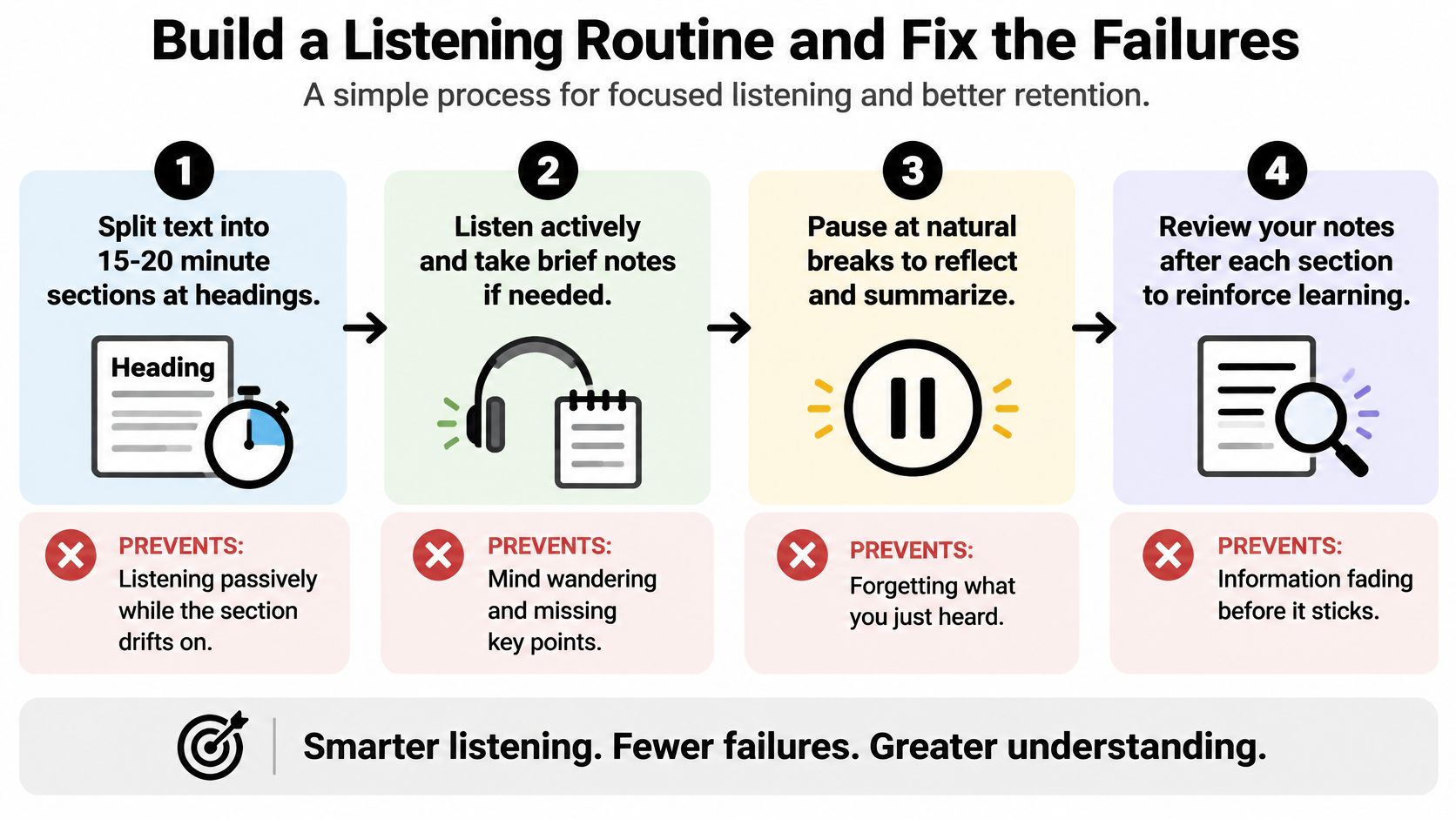
Most listening failures have nothing to do with the book or the app. A reader puts headphones on, presses play, keeps half an eye on a phone, and reaches the end of a chapter with nothing to show for it. Passive listening feels like reading and isn't.
The routine below is seven moves. Each one blocks a specific failure, and each takes seconds to set up.

Seven moves and the failure each one blocks
Split the text into 15 to 20 minute sections at headings. Every section then has a clear start and end, which blocks the drift that comes from listening to a chapter with no finish line. Stop at the heading even when you feel like carrying on, because a clean stopping point is what makes step four possible.
Convert the clean digital file, not a blurred scan. A photocopy of a photocopy produces wrong words and broken sentences, and a reader who has to decode garbled narration gives up within a page. Download the publisher's PDF or use the ebook edition whenever the school provides one.
Take the first pass at 0.9x to 1.0x with highlighting on and the page in front of you. Dense material opened at double speed is heard, not read, and the reader can't tell the difference until the questions come. The page plus the highlight keeps eyes and ears on the same word.
Pause at every heading and write one sentence. One sentence, in your own words, about what that stretch said. This is the move that turns listening into studying, and it blocks the comfortable illusion of understanding that a pleasant narrator creates.
Replay the hard passage at 0.8x instead of the whole chapter at full speed. Slowing everything wastes the easy sections you already followed. Slow the two paragraphs on the tricky concept and leave the rest where it is.
Answer three questions from memory before you move on. Name the main claim, one supporting detail, and one word you had to look up. If the page has to come open for any of them, the section didn't land.
Match the setting to the task. Commuting, cooking and laundry are for novels and review, where a missed sentence costs nothing. Keep the page open when spelling, a formula or a precise quotation matters, because those depend on the letters.
A worked example
Say the assignment is a 300 page novel over six weeks. One section a day, about twenty minutes, a one-sentence summary in a notebook, three questions at the end of each sitting. By week six you have several pages of notes in your own handwriting and a plot you can discuss without flipping back through the book.
Rename the file so it sorts first, convert it once, and the routine costs roughly twenty-five minutes a day.
What you can fix today and what takes weeks
Speed, voice and pronunciation are same-day fixes. If a character's name is being mangled in chapter three, set the pronunciation before you continue, and do the same for technical terms before a key chapter rather than halfway through it.
Summarising as a habit takes a few weeks to feel natural, and it will feel slow at first. That's normal. The sentence you write is short; the reading it forces you to do is the work.
Decoding is a separate project on a separate timeline. Audio doesn't teach letter-sound patterns, so a reader who needs phonics or structured literacy teaching still needs it, alongside the listening and not instead of it. A tutor or a specialist teacher handles that; the audiobook handles access in the meantime.
If you can't answer three questions about the last section without opening the book again, you heard it. You didn't read it.
Run the same check after every section. When the answers come easily, keep the settings. When they don't, slow the passage or add a written summary, and don't change the speed until that section is solid. That check is also how you'll know whether a new app or a new voice is helping, rather than just sounding nicer.
Choose Your Audiobook Setup for Dyslexia
Take one file and one session. That's the whole method, and a single real chapter is a better experiment than a week spent reading about settings.
Use the history chapter that took forty minutes to decode as your test file.
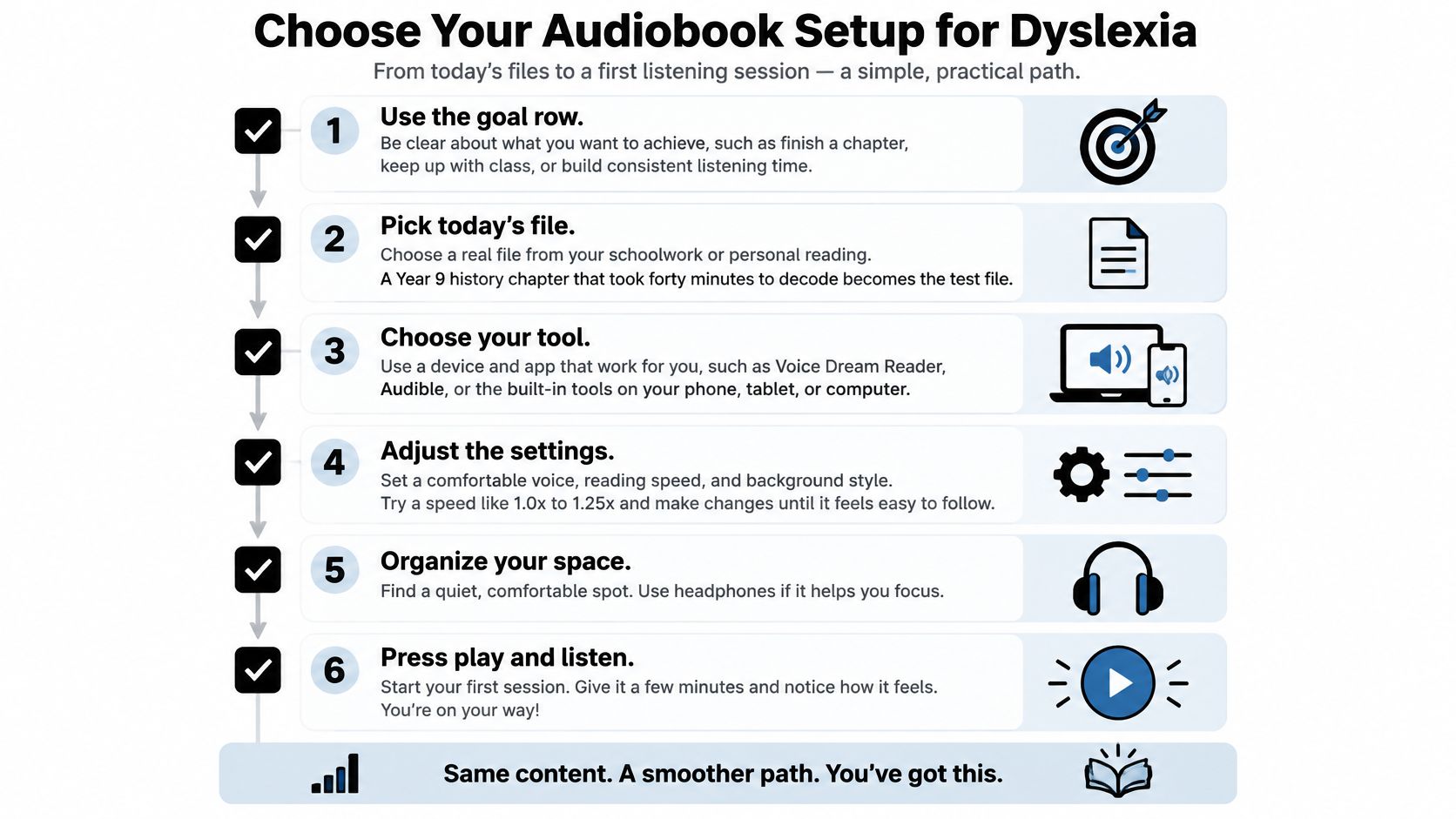

Use the goal row. A class novel or set text needs synced text on screen. Pleasure reading can travel as a portable MP3 or M4B. Spelling practice stays with phonics, not with audio, however many titles you download.
Convert your own source first. If the chapter lives as a PDF, an EPUB, a TXT file, your own notes or a link from the school portal, put that file through your reader app rather than hunting for a commercial audiobook that may not exist. Prefer the clean digital textbook over a photo of a page, and check that the headings survived the conversion before you start listening.
Set the voice, the speed and the highlighting before you press play. One clear voice, 0.9x to 1.0x, highlighting on, pronunciation corrected for the names in this chapter. Setting these mid-chapter is how readers lose their place and stop.
Play fifteen minutes and watch for the drift. Note the first moment your attention leaves the text. That moment is the data you need, and it usually points to one setting rather than five.
Stop and answer three questions. Then decide. Audio is access to grade-level content, and access is worth having on its own. It isn't a comprehension cure, and the fifteen-minute chapter will tell you which one you got.
If the summary fails, slow the passage or add a written check. Don't buy another title.
Audiobooks for Dyslexia works best as a starting point rather than a slogan, and the setup is where it becomes real. TTS Reader Pro turns the files you already have into speech: PDFs, EPUBs, TXT files, pasted web links and scanned printed pages, narrated in premium AI voices across more than 50 languages, with adjustable speed, pronunciation controls and reading progress that syncs with your Kindle app. Start with the history chapter on your own table, run the fifteen-minute test, and let three questions from memory tell you what to change. Visit TTS Pro to try it free.


No Comments
Leave a comment Cancel